The modern workspace has undergone a significant transformation, moving beyond static setups to embrace dynamic solutions that prioritize health and productivity. With prolonged sitting linked to various health issues, the ergonomic standing desk has become an essential tool for many. Yet, as you navigate the myriad options available, a critical decision arises: should you choose a single motor or a dual motor standing desk? This guide will equip you with the insights needed to make an informed choice for your 2026 workspace, ensuring your investment truly supports your well-being and efficiency.
Understanding Standing Desk Mechanics
Electric standing desks have become the mainstream choice for their ease of height adjustment, making frequent transitions between sitting and standing effortless. These desks rely on internal motor systems to lift and lower the desktop. The fundamental difference lies in the number of motors employed, which profoundly impacts performance, stability, and durability.
Single Motor Standing Desks
Single motor standing desks operate with one motor, typically housed in one of the desk legs. This motor uses a central shaft, often a hexagonal rod, to transfer power to both legs, ensuring they move in unison. This design prioritizes simplicity and cost-effectiveness, making it an accessible entry point into the world of ergonomic workstations.
- Pros:
- Cost-Effective: Generally more affordable, making them ideal for budget-conscious buyers or those with basic needs.
- Simpler Design: With fewer components, these desks often feature a more straightforward construction and can sometimes be easier to assemble.
- Energy Efficient: The single motor may consume less power during operation compared to two motors.
- Cons:
- Lower Weight Capacity: Typically supporting around 150-180 lbs (70-80 kg), they are best suited for minimalist setups with a laptop or single monitor. Heavier loads can strain the single motor.
- Slower Adjustment Speeds: Transitions from sitting to standing or vice-versa are generally slower, often around 1 inch per second, which can be noticeable if you adjust frequently.
- Potential Stability Issues: At higher standing heights, single motor desks can exhibit more wobble due to the single point of power distribution.
- Increased Noise: The single motor works harder under load, potentially resulting in a more noticeable hum or whine during adjustments.
- Shorter Lifespan: Frequent use with heavy loads can put excessive strain on the sole motor, potentially leading to faster wear and tear and a shorter operational lifespan.
|
Our Picks for the Best Standing Desk in 2026
As an Amazon Associate I earn from qualifying purchases.
|
||
| Num | Product | Action |
|---|---|---|
| 1 | Huuger 55 x 28 Large Electric Standing Desk, Height Adjustable Computer Desk, 27.6" Deep Desktop, Stand up Gaming Office Desk with 2 Hooks, 3 Preset Heights, for Home Office, Rustic Brown |

|
| 2 | HUANUO 32" Small Electric Standing Desk Adjustable Height, 4 Memory Height Settings, Sit Stand Up Desk for Home Office & Computer Workstation, Sage Green |
|
| 3 | Huuger 55 x 28 Large Electric Standing Desk, Height Adjustable Desk, 27.6" Deep Desktop, Stand up Gaming Computer Office Desk with 2 Hooks, 3 Preset Heights, for Home Office, Grey |
|
| 4 | HUANUO 32" Small Electric Standing Desk Adjustable Height, 4 Memory Height Settings, Sit Stand Up Desk for Home Office & Computer Workstation, LightWalnut |
|
| 5 | HUANUO 32" Small Electric Standing Desk Adjustable Height, 4 Memory Height Settings, Sit Stand Up Desk for Home Office & Computer Workstation, Black |
|
| 6 | HUANUO 32" Small Electric Standing Desk Adjustable Height, 4 Memory Height Settings, Sit Stand Up Desk for Home Office & Computer Workstation, Black and Gold Frame |
|
| 7 | HUANUO 32" Small Electric Standing Desk Adjustable Height, 4 Memory Height Settings, Sit Stand Up Desk for Home Office & Computer Workstation, Vintage Brown |
|
| 8 | Huuger 55 x 28 Large Electric Standing Desk, Height Adjustable Computer Desk, 27.6" Deep Desktop, Stand up Gaming Office Table with 2 Hooks, 3 Preset Heights, for Home Office, Black |
|
| 9 | HUANUO 32" Small Electric Standing Desk Adjustable Height, 4 Memory Height Settings, Sit Stand Up Desk for Home Office & Computer Workstation, Black Walnut |
|
| 10 | Huuger 55 x 28 Large Electric Standing Desk, Height Adjustable Copmuter Desk, 27.6" Deep Desktop, Stand up Gaming Office Table with 2 Hooks, 3 Preset Heights, for Home Office, White |
|
Dual Motor Standing Desks
In contrast, dual motor standing desks feature a dedicated motor within each leg column. These motors are electronically synchronized by a control box to move simultaneously and seamlessly. This direct-drive system represents a significant leap in engineering, offering superior performance capabilities for more demanding setups.
- Pros:
- Higher Weight Capacity: Capable of supporting 220 lbs (100 kg) or more, making them ideal for multiple monitors, desktop PCs, and heavy equipment. Each motor handles half the load, reducing individual strain.
- Faster and Smoother Adjustments: Dual motors facilitate quicker transitions, often at 1.5 inches per second or more, and provide a remarkably smooth, fluid movement.
- Superior Stability: With power applied symmetrically, dual motor desks are inherently more stable, even at their maximum height, significantly reducing wobble.
- Quieter Operation: Since each motor works less strenuously, dual motor systems tend to be noticeably quieter, often operating below 50 decibels (ideally around 45 dB), making them suitable for shared or quiet environments.
- Longer Lifespan: The distributed workload reduces stress and heat generation, contributing to greater durability and a longer operational lifespan.
- Advanced Features: Higher-end dual motor desks frequently include features like memory presets, anti-collision technology, and more refined control systems.
- Cons:
- Higher Cost: Due to the additional motor and more complex engineering, dual motor desks come with a higher price tag.
- More Complex Design: While generally reliable, having more electronic components means a greater reliance on synchronization.
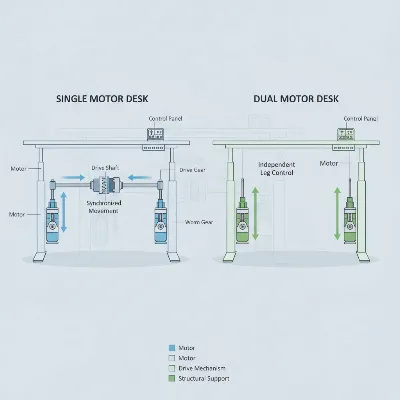 Conceptual illustration of single vs dual motor standing desk mechanisms for comparison
How to Choose the Right Standing Desk
Selecting the perfect standing desk involves more than just aesthetics; it’s about matching the desk’s capabilities to your specific needs and priorities. Here’s a comprehensive guide to help you choose wisely:
Determine Your Usage Needs
Before diving into specifications, consider how you’ll use the desk. Are you working from home with a simple laptop setup, outfitting a corporate office with multiple monitors, or building a high-performance gaming station? Your typical load (monitors, PC, accessories), frequency of height adjustments, and the overall size of your workspace will dictate the most suitable desk. Define your budget early, as it will narrow down your options, though remember that a slightly higher investment often translates to better long-term value.
Select the Appropriate Motor Type
Your choice between single and dual motor systems should align directly with your determined needs. If you have a minimalist setup, limited budget, and don’t anticipate frequent adjustments, a single motor desk might suffice. However, for most professional and gaming applications, especially those involving multiple monitors or heavy equipment, a dual motor desk offers a significantly better and more reliable experience due to its superior weight capacity, stability, and smoother operation.
Material and Build Quality
The longevity and stability of your standing desk largely depend on its construction. Look for frames made from high-grade steel, ideally cold-rolled, as these offer superior strength and durability. Features like a wedge design or crossbar significantly reduce wobble, particularly at maximum height. The desktop material also matters; solid wood or bamboo tops provide a robust and aesthetic surface that resists warping and wear over time. Always check the warranty offered by manufacturers, as a longer warranty often reflects confidence in build quality.
Key Features and Conveniences
Modern standing desks offer a range of features that can enhance your daily workflow:
- Memory Presets: Essential for quickly returning to your preferred sitting and standing heights with the touch of a button.
- Anti-Collision Technology: This safety feature automatically stops the desk from moving if it encounters an obstacle, protecting both your equipment and nearby objects.
- Cable Management: Integrated grommets, trays, or channels help keep your workspace tidy and free from clutter.
- Quiet Operation: For home offices or shared environments, a desk that operates quietly (ideally below 50 decibels) prevents distractions.
- Ease of Assembly: While many desks are designed for DIY assembly, clear instructions or optional professional installation can save time and frustration.
Comparison: Single vs. Dual Motor Standing Desks
| Feature | Single Motor Standing Desks | Dual Motor Standing Desks |
|---|---|---|
| Cost | Lower, entry-level | Higher, premium investment |
| Weight Capacity | 150-180 lbs (70-80 kg) | 220+ lbs (100-125 kg) |
| Adjustment Speed | Slower (~1 inch/second) | Faster (~1.5+ inches/second) |
| Stability | Adequate for light loads, potential wobble at height | Superior, balanced lifting, minimized wobble |
| Noise Level | Can be audible under load | Generally quieter, especially at lower RPMs |
| Durability | Moderate, less strain-resistant with heavy use | High, distributed load reduces wear and tear |
| Ideal Use | Budget-conscious, minimalist setups | Multi-monitor, heavy equipment, frequent adjustments |
| Features | Basic height adjustment | Memory presets, anti-collision often included |
The Benefits of a Standing Desk
Regardless of the motor type, integrating a standing desk into your routine offers profound benefits for both your health and productivity.
Improve Your Health
Regularly alternating between sitting and standing positions can significantly mitigate the adverse effects of prolonged sitting. It helps to reduce chronic back and neck pain, common ailments among office workers, by encouraging subtle movements and better posture. Standing also promotes improved blood circulation, keeps your muscles engaged, and can even contribute to burning more calories throughout the day.
Enhance Your Productivity
A dynamic workstation keeps you more alert and focused. The physical act of standing can boost energy levels, reducing the afternoon slump often associated with continuous sitting. This increased vitality translates into better concentration, reduced mental fatigue, and can even foster greater creativity and problem-solving abilities.
“Extended periods of sitting can significantly impact health and focus. A quality standing desk provides a crucial solution, empowering individuals to reclaim their well-being and elevate their performance.”
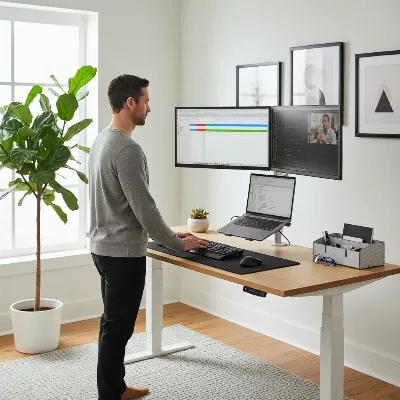 A modern home office setup with a dual motor standing desk in use, promoting productivity and health
Conclusion
Choosing between a single motor and a dual motor standing desk in 2026 ultimately boils down to a clear understanding of your individual needs, workstation demands, and budget. While single motor desks offer an economical and functional solution for lighter setups, dual motor desks undeniably provide superior performance, stability, and durability for the vast majority of users, particularly those with complex or heavy equipment and a desire for frequent, seamless adjustments. Investing in the right standing desk is an investment in your long-term health and productivity. By considering the factors outlined in this guide, you can confidently select a standing desk that empowers you to work smarter, healthier, and with greater comfort for years to come. What will your ideal Standing Desk empower you to achieve?
Frequently Asked Questions
Is a dual-motor desk always better than a single-motor desk?
For most users with modern computer setups (e.g., one or more monitors, a desktop PC), a dual-motor desk offers superior value due to higher weight capacity, stability, and smoother, quieter operation. A single-motor desk is typically only recommended for very light, minimalist setups or if budget is the absolute primary concern.
What is the ideal noise level for a standing desk?
For home or shared offices, a noise level under 50 decibels (dB) is generally considered ideal. Many quality dual-motor desks are engineered to operate at or below 45 dB, ensuring that height adjustments do not disrupt your concentration or others around you.
How much weight can a standing desk hold?
Single motor desks typically support around 150-180 lbs (70-80 kg). Dual motor desks significantly exceed this, often handling 220 lbs (100 kg) or more. Always check the manufacturer’s specified weight capacity, especially if you have multiple monitors, heavy equipment, or a solid wood desktop.
How can I prevent standing desk wobble?
Wobble can be minimized by choosing a desk with a robust, heavy-duty steel frame, features like a wedge design or crossbar, and ensuring all screws are securely tightened during assembly. Dual-motor desks also inherently offer better stability due to their balanced lifting mechanism.
How long do standing desk motors typically last?
Dual motor desks generally have a longer operational lifespan than single motor desks. This is because the workload is distributed, reducing strain and wear on individual components. High-quality dual motor systems often come with longer warranties (e.g., 5-10 years) reflecting their enhanced durability.