Choosing between a single motor and a dual motor standing desk depends on your specific needs, workstation demands, and budget. Dual motor desks generally offer superior performance, stability, and durability for most users, supporting over 220 lbs (100 kg) with smoother, quieter adjustments. Single motor desks are more economical, typically supporting 150-180 lbs (70-80 kg), and are best suited for minimalist setups with infrequent adjustments.
Understanding Standing Desk Mechanics
Electric standing desks are popular for their easy height adjustment, allowing effortless transitions between sitting and standing. These desks use internal motor systems to lift and lower the desktop. The key difference lies in the number of motors, which significantly impacts performance, stability, and durability.
Single Motor Standing Desks
Single motor standing desks operate with one motor, usually located in one leg. This motor uses a central shaft to transfer power to both legs, ensuring synchronized movement. This design prioritizes simplicity and cost-effectiveness, making it an accessible option for ergonomic workstations.
- Pros:
- Cost-Effective: Generally more affordable, ideal for budget-conscious buyers or those with basic needs.
- Simpler Design: Fewer components often mean a more straightforward construction and easier assembly.
- Energy Efficient: A single motor may consume less power during operation.
- Cons:
- Lower Weight Capacity: Typically supports around 150-180 lbs (70-80 kg), best for minimalist setups. Heavier loads can strain the motor.
- Slower Adjustment Speeds: Transitions are generally slower, often around 1 inch per second.
- Potential Stability Issues: At higher standing heights, these desks can exhibit more wobble due to a single point of power distribution.
- Increased Noise: The single motor works harder under load, potentially resulting in a more noticeable hum or whine.
- Shorter Lifespan: Frequent use with heavy loads can lead to faster wear and tear.
Dual Motor Standing Desks
Dual motor standing desks feature a dedicated motor within each leg column. These motors are electronically synchronized by a control box for simultaneous and seamless movement. This direct-drive system offers superior performance for more demanding setups.
- Pros:
- Higher Weight Capacity: Capable of supporting 220 lbs (100 kg) or more, ideal for multiple monitors, desktop PCs, and heavy equipment.
- Faster and Smoother Adjustments: Dual motors facilitate quicker transitions, often at 1.5 inches per second or more, with fluid movement.
- Superior Stability: With power applied symmetrically, dual motor desks are inherently more stable, even at maximum height, significantly reducing wobble.
- Quieter Operation: Dual motor systems tend to be noticeably quieter, often operating below 50 decibels (ideally around 45 dB).
- Longer Lifespan: Distributed workload reduces stress and heat, contributing to greater durability.
- Advanced Features: Higher-end dual motor desks often include memory presets, anti-collision technology, and refined control systems.
- Cons:
- Higher Cost: Due to the additional motor and more complex engineering, dual motor desks come with a higher price tag.
- More Complex Design: While reliable, more electronic components mean a greater reliance on synchronization.
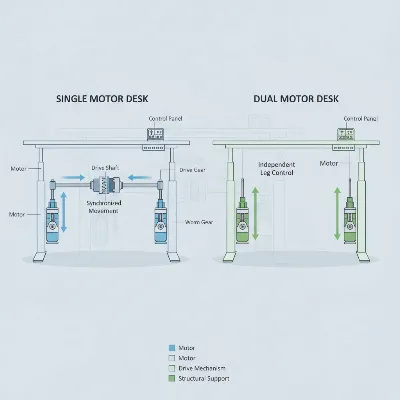 Conceptual illustration of single vs dual motor standing desk mechanisms for comparison
How to Choose the Right Standing Desk
Selecting the perfect standing desk involves matching its capabilities to your specific needs and priorities. Here’s a comprehensive guide to help you choose wisely:
Determine Your Usage Needs
|
Our Picks for the Best Standing Desk in 2026
As an Amazon Associate I earn from qualifying purchases.
|
||
| Num | Product | Action |
|---|---|---|
| 1 | Huuger 55 x 28 Large Electric Standing Desk, Height Adjustable Computer Desk, 27.6" Deep Desktop, Stand up Gaming Office Table with 2 Hooks, 3 Preset Heights, for Home Office, Black |

|
| 2 | Small Height Adjustable Electric Standing Desk, 31.5" x 23.6" Sit Stand up Desk with Splice Board, Ergonomic Rising Computer Home Office Desk Table with Memory Preset, White Frame/White Top |
|
| 3 | ERGOMAKER 63" Electric Standing Desk, Adjustable Height, Sit Stand Up Desk for Home Office & Computer Workstations, Memory Controller, White |
|
| 4 | Adjustable Standing Desk with Cable Management, 48 X 24 Inches Electric Stand Up Desk, 176LBS Load, 2 Memory Preset Height Table for Home Office Work with Splice Board (Rustic Brown Desktop) |
|
| 5 | HUANUO 32" Small Electric Standing Desk Adjustable Height, 4 Memory Height Settings, Sit Stand Up Desk for Home Office & Computer Workstation, LightWalnut |
|
| 6 | Kingant Standing Desk Height Adjustable Small Electric Stand Up Desks [35 x 20 Inch] - Ergonomic Sit Stand Desk Rising Desks for Home Office Computer Desk Stand Desk Workstation with Cable Management |
|
| 7 | Marsail Glass Standing Desk with Drawer 37 x 22 Inches Stand up Desk Standing Desk Adjustable Height with One-Piece Tempered Glass Top, Ergonomic Home Office Desk with 4 Preset Heights White |
|
| 8 | HUANUO Electric Small Standing Desk, 35" x 20" Whole Piece Desktop, Adjustable Height Computer Desk, 4 Height Memory Settings, Sit Stand Up Desk for Home Office, White |
|
| 9 | Standing Desk, Height Adjustable Electric Stand up Desk, 55 x 24 Inches Sit Stand Home Office Desk with Splice Board, Black Frame/Black Top |
|
| 10 | ERGOMAKER Electric Standing Desk, 67" x 23.6" Height Adjustable Sit Stand Desk with Splice Board for Home Office, Computer Table Memory Preset (White Frame, White Desktop) |
|
Consider your typical load (monitors, PC, accessories), frequency of height adjustments, and workspace size. Define your budget early, as it will narrow down your options, though a slightly higher investment often translates to better long-term value.
Select the Appropriate Motor Type
If you have a minimalist setup, limited budget, and don’t anticipate frequent adjustments, a single motor desk might suffice. However, for most professional and gaming applications, especially those involving multiple monitors or heavy equipment, a dual motor desk offers a significantly better and more reliable experience due to its superior weight capacity, stability, and smoother operation.
Material and Build Quality
Look for frames made from high-grade steel, ideally cold-rolled, for superior strength and durability. Features like a wedge design or crossbar significantly reduce wobble. Solid wood or bamboo tops provide a robust and aesthetic surface. Always check the warranty offered by manufacturers.
Key Features and Conveniences
Modern standing desks offer a range of features that can enhance your daily workflow:
- Memory Presets: Essential for quickly returning to preferred sitting and standing heights.
- Anti-Collision Technology: This safety feature automatically stops the desk if it encounters an obstacle.
- Cable Management: Integrated grommets, trays, or channels help keep your workspace tidy.
- Quiet Operation: For home offices or shared environments, a desk that operates quietly (ideally below 50 decibels) prevents distractions.
- Ease of Assembly: Clear instructions or optional professional installation can save time and frustration.
Comparison: Single vs. Dual Motor Standing Desks
| Feature | Single Motor Standing Desks | Dual Motor Standing Desks |
|---|---|---|
| Cost | Lower, entry-level | Higher, premium investment |
| Weight Capacity | 150-180 lbs (70-80 kg) | 220+ lbs (100-125 kg) |
| Adjustment Speed | Slower (~1 inch/second) | Faster (~1.5+ inches/second) |
| Stability | Adequate for light loads, potential wobble at height | Superior, balanced lifting, minimized wobble |
| Noise Level | Can be audible under load | Generally quieter, especially at lower RPMs |
| Durability | Moderate, less strain-resistant with heavy use | High, distributed load reduces wear and tear |
| Ideal Use | Budget-conscious, minimalist setups | Multi-monitor, heavy equipment, frequent adjustments |
| Features | Basic height adjustment | Memory presets, anti-collision often included |
The Benefits of a Standing Desk
Regardless of the motor type, integrating a standing desk into your routine offers profound benefits for both your health and productivity.
Improve Your Health
Regularly alternating between sitting and standing positions can significantly mitigate the adverse effects of prolonged sitting. It helps to reduce chronic back and neck pain by encouraging subtle movements and better posture. Standing also promotes improved blood circulation, keeps muscles engaged, and can contribute to burning more calories.
Enhance Your Productivity
A dynamic workstation keeps you more alert and focused. The physical act of standing can boost energy levels, reducing the afternoon slump. This increased vitality translates into better concentration, reduced mental fatigue, and can foster greater creativity and problem-solving abilities.
“Extended periods of sitting can significantly impact health and focus. A quality standing desk provides a crucial solution, empowering individuals to reclaim their well-being and elevate their performance.”
 A modern home office setup with a dual motor standing desk in use, promoting productivity and health
Conclusion
Choosing between a single motor and a dual motor standing desk ultimately boils down to a clear understanding of your individual needs, workstation demands, and budget. While single motor desks offer an economical and functional solution for lighter setups, dual motor desks undeniably provide superior performance, stability, and durability for the vast majority of users, particularly those with complex or heavy equipment and a desire for frequent, seamless adjustments. Investing in the right standing desk is an investment in your long-term health and productivity. By considering the factors outlined in this guide, you can confidently select a standing desk that empowers you to work smarter, healthier, and with greater comfort for years to come. What will your ideal standing desk empower you to achieve?
Frequently Asked Questions
Frequently Asked Questions
Is a dual-motor desk always better than a single-motor desk?
For most users with modern computer setups, a dual-motor desk offers superior value due to higher weight capacity (220+ lbs), stability, and smoother, quieter operation. A single-motor desk is typically only recommended for very light, minimalist setups or if budget is the absolute primary concern.
What is the ideal noise level for a standing desk?
For home or shared offices, a noise level under 50 decibels (dB) is generally considered ideal. Many quality dual-motor desks are engineered to operate at or below 45 dB, ensuring that height adjustments do not disrupt concentration.
How much weight can a standing desk hold?
Single motor desks typically support around 150-180 lbs (70-80 kg). Dual motor desks significantly exceed this, often handling 220 lbs (100 kg) or more. Always check the manufacturer's specified weight capacity for your specific model.
How can I prevent standing desk wobble?
Wobble can be minimized by choosing a desk with a robust, heavy-duty steel frame, features like a wedge design or crossbar, and ensuring all screws are securely tightened during assembly. Dual-motor desks also inherently offer better stability due to their balanced lifting mechanism.
How long do standing desk motors typically last?
Dual motor desks generally have a longer operational lifespan than single motor desks because the workload is distributed, reducing strain and wear on individual components. High-quality dual motor systems often come with longer warranties, such as 5-10 years, reflecting their enhanced durability.
How to Choose the Right Standing Desk
Selecting the perfect standing desk involves matching its capabilities to your specific needs and priorities, considering usage, motor type, and build quality.
Consider your typical load, including monitors, PC, and accessories, along with the frequency of height adjustments and overall workspace size. Define your budget early, as it will narrow down your options and help prioritize features.
Choose a single motor desk for minimalist setups, limited budgets, and infrequent adjustments. Opt for a dual motor desk for professional or gaming applications involving multiple monitors or heavy equipment, prioritizing superior weight capacity and stability.
Look for frames made from high-grade steel, ideally cold-rolled, for superior strength and durability. Features like a wedge design or crossbar significantly reduce wobble, especially at maximum height. Check the manufacturer's warranty as an indicator of confidence in build quality.
Prioritize features like memory presets for quick height adjustments and anti-collision technology for safety. Integrated cable management helps keep your workspace tidy, and quiet operation (below 50 decibels) is crucial for shared environments.
Get our weekly buyer guide
Practical specs, not advice. Unsubscribe anytime.

My old desk was a manual crank, and I hated adjusting it. The electric standing desk with the dual motor system is a dream! The effortless transitions between sitting and standing have made such a difference in my workday. I can’t believe I waited so long to upgrade.
I was on the fence about spending more for a dual motor desk, but after reading about the stability difference, I went for it. My setup has two monitors and a heavy gaming PC, so the 220 lbs weight capacity is perfect. It adjusts so smoothly and quietly, it’s a game changer for my home office.
I opted for a single motor desk to save some money, and it’s mostly fine for my laptop and a single monitor. However, I do notice it’s a bit slower to adjust than I expected, and sometimes it feels a little wobbly when it’s at its highest setting. I probably should have splurged for the dual motor.
I’ve had my dual motor desk for about six months now, and it’s been fantastic. The quiet adjustments are a huge plus, especially since I often switch positions during calls. It handles my heavy equipment without any issues, and the durability seems really good so far. Definitely worth the investment for a serious workstation.