To hide messy cords on a standing desk, centralize power with an under-desk cable tray, route horizontal cables neatly, and manage vertical movement with flexible cable spines. This approach ensures cables move smoothly with height adjustments, preventing snags and creating a professional, clutter-free workspace. Implementing these solutions enhances aesthetics, improves safety by reducing tripping hazards, and boosts productivity by minimizing visual distractions.
Common Types of Standing Desk Cable Management Solutions
Managing the array of cables on a standing desk requires a strategic mix of tools designed for flexibility and concealment. What solutions are most effective for taming the wires of an adjustable workstation? Different accessories offer unique advantages, from discreet routing to comprehensive power centralization, ensuring every cable finds its place.
Under-Desk Cable Trays
Under-desk cable trays are fundamental for any clean standing desk setup. These trays, often made of metal or mesh, mount directly to the underside of your desk, providing a hidden compartment for power strips, bulky adapters, and excess cable length. They keep the majority of your wiring out of sight and off the floor, moving seamlessly with your desk as you adjust its height. J-channel trays are particularly favored for their easy access, allowing you to add or remove cables without extensive re-installation. For shop curated ergonomic office on this site.
Cable Sleeves and Wraps
For cables that must remain visible or those running together from a single source, cable sleeves offer an elegant solution. These fabric, neoprene, or plastic wraps bundle multiple wires into a single, cohesive unit, creating a much cleaner aesthetic than individual strands. Available in various lengths and styles—including zippered, Velcro, or self-closing designs—sleeves prevent tangling and can be cut to size, helping maintain a minimalist look around monitor arms or desk legs.
Cable Spines and Channels
When dealing with vertical cable runs, especially from the desk to the floor, cable spines (also known as cable snakes or conduits) are invaluable. These flexible, segmented structures guide and protect cables while accommodating the full range of motion of your standing desk. Attaching to the desk frame and often weighted at the bottom, they ensure cables move smoothly without tension, preventing damage and maintaining a tidy appearance even during height transitions. Magnetic cable channels also offer a sleek solution for vertical routing along metal desk legs.
Cable Ties and Clips
The unsung heroes of micro-management, cable ties and clips provide precision control over individual wires. Reusable Velcro ties are excellent for bundling excess cable length or securing small groups of wires, offering flexibility for future adjustments. Adhesive cable clips can be strategically placed along the underside of your desk or monitor arm to guide wires precisely along predetermined paths, keeping them secure and out of sight. These small tools are perfect for finishing touches and preventing minor tangles.
Desk Grommets and Boxes
|
Our Picks for the Best Standing Desk in 2026
As an Amazon Associate I earn from qualifying purchases.
|
||
| Num | Product | Action |
|---|---|---|
| 1 | Adjustable Standing Desk with Cable Management, 48 X 24 Inches Electric Stand Up Desk, 176LBS Load, 2 Memory Preset Height Table for Home Office Work with Splice Board (Rustic Brown Desktop) |

|
| 2 | Standing Desk, Height Adjustable Electric Stand up Desk, 55 x 24 Inches Sit Stand Home Office Desk with Splice Board, Black Frame/Black Top |
|
| 3 | Huuger 55 x 28 Large Electric Standing Desk, Height Adjustable Computer Desk, 27.6" Deep Desktop, Stand up Gaming Office Table with 2 Hooks, 3 Preset Heights, for Home Office, Black |
|
| 4 | Kingant Standing Desk Height Adjustable Small Electric Stand Up Desks [35 x 20 Inch] - Ergonomic Sit Stand Desk Rising Desks for Home Office Computer Desk Stand Desk Workstation with Cable Management |
|
| 5 | HUANUO 32" Small Electric Standing Desk Adjustable Height, 4 Memory Height Settings, Sit Stand Up Desk for Home Office & Computer Workstation, LightWalnut |
|
| 6 | ERGOMAKER Electric Standing Desk, 67" x 23.6" Height Adjustable Sit Stand Desk with Splice Board for Home Office, Computer Table Memory Preset (White Frame, White Desktop) |
|
| 7 | ERGOMAKER 63" Electric Standing Desk, Adjustable Height, Sit Stand Up Desk for Home Office & Computer Workstations, Memory Controller, White |
|
| 8 | Small Height Adjustable Electric Standing Desk, 31.5" x 23.6" Sit Stand up Desk with Splice Board, Ergonomic Rising Computer Home Office Desk Table with Memory Preset, White Frame/White Top |
|
| 9 | HUANUO Electric Small Standing Desk, 35" x 20" Whole Piece Desktop, Adjustable Height Computer Desk, 4 Height Memory Settings, Sit Stand Up Desk for Home Office, White |
|
| 10 | Marsail Glass Standing Desk with Drawer 37 x 22 Inches Stand up Desk Standing Desk Adjustable Height with One-Piece Tempered Glass Top, Ergonomic Home Office Desk with 4 Preset Heights White |
|
For a truly integrated look, desk grommets are openings drilled into the desktop, allowing cables to pass through cleanly. Often fitted with a brush or cover, they minimize gaps and block dust, creating a professional entry point for monitor cables or charging cords. Desktop cable management boxes are another effective solution for containing power strips, adapters, and chargers directly on the desk surface, hiding them within a stylish enclosure to reduce desktop clutter and improve safety.
A Step-by-Step Guide to Professional Cable Management
Achieving a perfectly organized standing desk isn’t just about having the right tools; it’s about a methodical approach. How do you go from a chaotic mess to a professionally managed workspace? This comprehensive guide walks you through the process, ensuring every wire is where it should be.
1. Plan Your Setup and Gather Tools
Before you unplug a single device, take a moment to assess your current setup. Identify all devices, their power sources, and the cables connecting them. Consider where outlets are located and how your desk moves. Visualize the ideal path for each cable, aiming for the shortest and most discreet route. Then, gather your essential cable management tools: an under-desk cable tray, cable sleeves, reusable Velcro ties, adhesive clips, and a power strip. A clean slate is crucial, so unplug everything and clear your workspace.
2. Centralize Power Under Your Desk
The cornerstone of effective standing desk cable management is centralizing your power. Instead of having multiple device cables running to various wall outlets, mount a surge-protected power strip or power brick directly to the underside of your desk using brackets or strong adhesive Velcro. This creates a single, movable power hub that travels with your desk. Plug all your monitors, chargers, and other peripherals into this mounted power strip. This dramatically reduces the number of cables extending to the floor, simplifying your overall setup.
3. Route Horizontal Cables Neatly
With your power centralized, focus on the horizontal cable runs under your desktop. Utilize your under-desk cable tray to house the power strip and any bulky adapters. Gather the power and data cables from your devices and neatly arrange them within the tray. Use Velcro ties to bundle similar cables together (e.g., monitor cables, charging cables). If your monitor arm has integrated cable channels, feed those cables through. The goal is to keep as many cables as possible contained within the tray or along the underside of the desk surface, away from sight.
4. Manage Vertical Cable Movement
The unique challenge of a standing desk is managing cables that must move vertically. From your under-desk power hub or cable tray, you’ll typically have one main power cable (from the power strip) and potentially a few data cables (like an Ethernet cable if not using Wi-Fi) that need to reach floor outlets or network ports. This is where a cable spine or a flexible cable sleeve becomes essential. Attach the cable spine to the desk frame and guide these crucial cables through it, allowing them to expand and contract smoothly with desk height adjustments without tension or tangling. Always ensure there is sufficient slack for the desk’s full range of motion.
5. Finalize with Ties and Aesthetics
Once the main routing is complete, use cable clips to secure individual wires that might still be loose or need extra guidance, particularly along desk legs or monitor arms. Tidy up any remaining excess cable length by bundling it with Velcro ties and tucking it into the tray or along an out-of-sight surface. For cables that pass through the desktop, use desk grommets for a clean finish. Finally, test your standing desk through its full range of motion several times, observing that no cables snag, pull, or become overly taut. Adjust as needed to ensure smooth, uninterrupted operation.
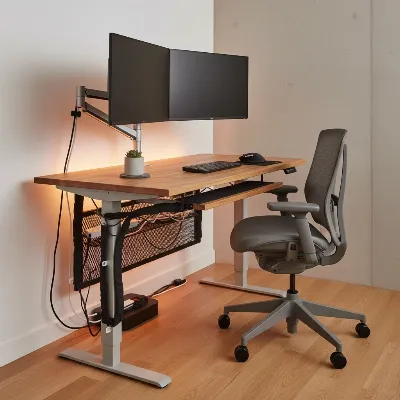 A professional standing desk setup with neatly hidden cables and organized peripherals.
Comparison of Popular Cable Management Products
Selecting the right tools is key to a tidy standing desk. Which cable management products offer the best solutions for different needs? This comparison highlights the strengths and weaknesses of popular options to help you decide.
| Product Type | Best For | Pros | Cons |
|---|---|---|---|
| Under-Desk Cable Trays | Centralizing power, bulky adapters, multiple cables | Hides most cables effectively, easy to access for changes, moves with desk | Installation may require tools (screws), can be visible from certain angles |
| Cable Sleeves/Wraps | Bundling multiple visible cables, protecting wires | Creates a clean, unified aesthetic, flexible, protects cables from damage | Can be bulky if too many cables, not ideal for single cable routing, less flexible for individual cable access |
| Cable Spines/Channels | Vertical cable runs from desk to floor, height adjustment | Accommodates desk movement seamlessly, durable, protects cables | Can be visually prominent, requires clear floor space for the base |
| Cable Ties/Clips | Individual cable routing, minor bundling, precision | Inexpensive, versatile, discreet, great for small adjustments | Less robust for heavy bundles, can be time-consuming for extensive setups |
| Desktop Cable Boxes | Hiding power strips and chargers on the desktop | Reduces desktop clutter, enhances safety by containing power sources | Takes up desktop space, limited capacity, not suitable for under-desk routing |
The Benefits of a Tidy Standing Desk Setup
Investing time in cable management for your standing desk offers far more than just aesthetic improvements. What tangible benefits can you expect from a well-organized workspace? From safety to productivity, the advantages are compelling.
Enhanced Aesthetics and Professionalism
A clean, clutter-free workspace immediately elevates the look of your office. Untidy cables can make even the most expensive desk setup appear disorganized and unprofessional. By hiding messy cords, you create a sleek, minimalist environment that is pleasing to the eye, impressing clients or colleagues during video calls, and fostering a sense of calm and order. It reflects a meticulous attention to detail that extends beyond your desk.
Improved Safety and Reduced Hazards
Tangled cables are a significant safety hazard. They can cause tripping risks, especially in high-traffic areas, and can lead to damage to your equipment or the cables themselves if pulled or snagged. Proper cable management secures wires, preventing them from catching on feet, chairs, or the desk’s moving parts. This significantly reduces the risk of accidents, electrical shorts, or costly equipment repairs, ensuring a safer working environment for everyone.
Increased Productivity and Focus
A visually cluttered workspace is a mentally cluttered workspace. The constant distraction of messy cables can detract from your ability to focus, making it harder to concentrate on tasks. When your desk is tidy and organized, your mind is clearer, allowing for greater concentration and improved productivity. You spend less time untangling wires and more time on meaningful work, fostering a more efficient and enjoyable work experience.
Extended Cable Lifespan
Cables that are constantly bent, pulled, or pinched are prone to wear and tear. This can lead to fraying, exposed wires, and ultimately, damaged or non-functional cables. Effective cable management protects your cords by guiding them along safe paths, preventing excessive strain and friction. This proactive approach extends the lifespan of your valuable cables and accessories, saving you money on replacements and reducing electronic waste.
 An aerial view of a person working at a well-organized standing desk, highlighting productivity and focus.
Conclusion
Transforming your standing desk from a tangle of wires into a streamlined, efficient workspace is an investment that pays dividends in aesthetics, safety, and productivity. By strategically implementing solutions like under-desk cable trays, flexible cable spines, and discreet cable ties, you can conquer the unique challenges posed by adjustable desks. To centralize your power, plan your cable routes meticulously, and build in sufficient slack to accommodate height adjustments. A tidy standing desk setup not only looks professional but also enhances your focus, extends the life of your equipment, and creates a safer environment.
Are you ready to improve your workspace and unlock the full potential of your standing desk? Take the first step towards a clutter-free, productive future!
Frequently Asked Questions
Frequently Asked Questions
Why is cable management particularly important for standing desks?
Standing desks move vertically, requiring cables to accommodate constant height changes. Without proper management, cables can snag, pull, disconnect, or get damaged, posing safety hazards and disrupting your workflow. Effective solutions ensure smooth movement and functionality at all heights, protecting your equipment.
What are the essential tools for standing desk cable management?
Key tools include an under-desk cable tray for power centralization, cable sleeves or wraps for bundling, flexible cable spines for vertical runs, and reusable Velcro ties or adhesive clips for securing individual cables. Incorporating wireless peripherals can also significantly reduce the overall cable count.
How do I ensure cables have enough slack for height adjustments?
When setting up, test your desk at its highest and lowest positions to identify any tension points. Create service loops near connection points and use flexible solutions like cable spines or channels that expand and contract, ensuring cables can move freely without strain. This prevents damage and maintains functionality.
Can I use wireless peripherals to reduce cable clutter?
Absolutely. Switching to a wireless keyboard, mouse, and headphones can drastically reduce the number of cables required for your standing desk. This minimizes the need for extensive cable routing and contributes significantly to a cleaner, more minimalist setup, improving aesthetics and reducing potential snags.
How often should I review my standing desk cable management?
It's a good practice to review your cable management every few months, or whenever you add or remove new devices. Over time, cables can shift or new devices might introduce clutter. A quick periodic check ensures everything remains tidy, secure, and functional, preventing issues before they arise.
How to Professionally Manage Standing Desk Cables
Achieve a perfectly organized standing desk by following these steps to manage and hide your cables effectively, ensuring a clean and functional workspace.
Assess your current setup, identifying all devices, power sources, and cables. Visualize ideal cable paths for the shortest, most discreet routes. Gather essential tools like an under-desk cable tray, cable sleeves, Velcro ties, adhesive clips, and a power strip, then clear your workspace.
Mount a surge-protected power strip or power brick to the underside of your desk. This creates a single, movable power hub that travels with your desk. Plug all peripherals into this mounted strip to significantly reduce cables extending to the floor.
Utilize your under-desk cable tray to house the power strip and bulky adapters. Neatly arrange power and data cables within the tray, using Velcro ties to bundle similar cables. Keep as many cables as possible contained within the tray or along the underside of the desk.
For cables moving from the desk to the floor, use a cable spine or flexible cable sleeve. Attach it to the desk frame and guide crucial cables through, allowing them to expand and contract smoothly with height adjustments. Ensure sufficient slack for the desk's full range of motion.
Secure individual loose wires with cable clips along desk legs or monitor arms. Bundle any remaining excess cable length with Velcro ties and tuck it away. Use desk grommets for desktop cable pass-throughs and test the desk's full range of motion to ensure no snags or tension.
Get our weekly buyer guide
Practical specs, not advice. Unsubscribe anytime.

The advice on flexible cable spines for vertical movement was helpful, but I found that some of my thicker power cables were a bit of a tight squeeze. It works, but it took some effort to get everything tucked in neatly. Still, it’s better than having cables dangling everywhere, so I’m mostly satisfied with the result.
Seriously, if you have a standing desk, you NEED to manage your cables. The suggestion to use a strategic mix of tools, especially the under-desk cable tray, was a game-changer for me. My setup is now super clean, and the cables move smoothly with the height adjustments. No more snags or ugly wires!
I used to have such a mess of cords, and it was a real tripping hazard. Following the steps to route horizontal cables neatly really cleaned things up. My desk looks so much more professional, and I feel safer not having loose wires all over the floor. It definitely boosted my productivity by reducing visual distractions.
I finally tackled the spaghetti monster under my standing desk thanks to the tip about centralizing power with an under-desk cable tray. It made such a huge difference! My workspace looks so much cleaner now, and I don’t have to worry about accidentally unplugging something when I adjust the desk height. Highly recommend this approach for anyone with a lot of monitors and peripherals.