Standing desks can significantly improve posture by encouraging an upright position, promoting better spinal alignment, and engaging core muscles, directly combating the negative effects of prolonged sitting. Studies show that using a standing desk can reduce muscle fatigue and discomfort, especially for those with forward head posture, when used correctly with alternating sit-stand intervals every 30-60 minutes.
Popular Types of Standing Desks
Understanding the different types of standing desks available is the first step toward finding one that aligns with your specific needs and workspace. Each offers unique benefits and considerations.
Electric Standing Desks
Electric standing desks are the epitome of convenience, offering seamless height adjustment at the touch of a button. They typically feature powerful motors that quietly raise or lower the desktop, often with memory presets to store your preferred sitting and standing heights. This effortless transition encourages more frequent changes in posture, which is vital for ergonomic health. While generally a higher investment, their ease of use makes them highly appealing for those seeking a premium, dynamic workspace solution.
Manual Standing Desks
Manual, or crank-adjustable, standing desks offer a more budget-friendly alternative to their electric counterparts. These desks require you to manually turn a crank handle to adjust the height. While they lack the instantaneous adjustment of electric models, they still provide the fundamental benefit of alternating between sitting and standing. They are an excellent choice for individuals who prioritize cost-effectiveness and don’t mind a brief manual adjustment when switching positions.
Standing Desk Converters
For those not ready to commit to a full standing desk, converters or risers offer a flexible solution. These units sit on top of your existing desk and elevate your monitors and keyboard to standing height. They are typically lighter, more portable, and significantly more affordable, making them ideal for smaller spaces or temporary setups. While they may have a smaller work surface and less weight capacity, they provide an accessible entry point into the world of sit-stand ergonomics, allowing you to experience the postural benefits without replacing your entire workstation.
Your Guide to Choosing the Right Standing Desk
Selecting the perfect standing desk goes beyond simply picking a style. It’s about aligning the desk with your personal workflow, physical requirements, and financial considerations.
Define Your Usage Needs
Before making a purchase, consider how you’ll primarily use your standing desk. Are you a remote worker who spends eight hours a day at the computer, or do you simply need it for occasional tasks? Will it be in a dedicated home office, a shared living space, or a professional corporate environment? Your answers will help determine the necessary size, stability, and features. For instance, a hardcore gamer might prioritize a larger, more stable surface, while someone in a compact apartment might need a space-saving converter.
Select the Appropriate Desk Type
|
Our Picks for the Best Standing Desk in 2026
As an Amazon Associate I earn from qualifying purchases.
|
||
| Num | Product | Action |
|---|---|---|
| 1 | HUANUO 32" Small Electric Standing Desk Adjustable Height, 4 Memory Height Settings, Sit Stand Up Desk for Home Office & Computer Workstation, LightWalnut |

|
| 2 | ERGOMAKER 63" Electric Standing Desk, Adjustable Height, Sit Stand Up Desk for Home Office & Computer Workstations, Memory Controller, White |
|
| 3 | Adjustable Standing Desk with Cable Management, 48 X 24 Inches Electric Stand Up Desk, 176LBS Load, 2 Memory Preset Height Table for Home Office Work with Splice Board (Rustic Brown Desktop) |
|
| 4 | Marsail Glass Standing Desk with Drawer 37 x 22 Inches Stand up Desk Standing Desk Adjustable Height with One-Piece Tempered Glass Top, Ergonomic Home Office Desk with 4 Preset Heights White |
|
| 5 | Huuger 55 x 28 Large Electric Standing Desk, Height Adjustable Computer Desk, 27.6" Deep Desktop, Stand up Gaming Office Table with 2 Hooks, 3 Preset Heights, for Home Office, Black |
|
| 6 | Small Height Adjustable Electric Standing Desk, 31.5" x 23.6" Sit Stand up Desk with Splice Board, Ergonomic Rising Computer Home Office Desk Table with Memory Preset, White Frame/White Top |
|
| 7 | Kingant Standing Desk Height Adjustable Small Electric Stand Up Desks [35 x 20 Inch] - Ergonomic Sit Stand Desk Rising Desks for Home Office Computer Desk Stand Desk Workstation with Cable Management |
|
| 8 | HUANUO Electric Small Standing Desk, 35" x 20" Whole Piece Desktop, Adjustable Height Computer Desk, 4 Height Memory Settings, Sit Stand Up Desk for Home Office, White |
|
| 9 | Standing Desk, Height Adjustable Electric Stand up Desk, 55 x 24 Inches Sit Stand Home Office Desk with Splice Board, Black Frame/Black Top |
|
| 10 | ERGOMAKER Electric Standing Desk, 67" x 23.6" Height Adjustable Sit Stand Desk with Splice Board for Home Office, Computer Table Memory Preset (White Frame, White Desktop) |
|
With your needs clearly defined, you can now narrow down the desk type. If frequent, smooth transitions between sitting and standing are crucial for your posture and productivity, an electric standing desk is likely your best bet. If budget is a primary concern and you’re comfortable with manual adjustments, a crank-adjustable desk offers excellent value. For those with limited space or a desire to test the waters before a full investment, a standing desk converter provides a practical and economical starting point.
Material and Durability
The longevity and stability of your standing desk are largely dependent on its materials and construction. Opt for desks made from robust materials like solid wood, industrial-grade particleboard with a durable laminate finish, or steel frames. These materials ensure the desk can withstand daily use and support your equipment without wobbling. A sturdy frame is particularly important for standing desks, as stability directly impacts your ability to maintain good posture and focus while working.
Features and Conveniences
Modern standing desks often come equipped with a variety of features designed to enhance your user experience. Consider whether you need integrated USB charging ports, cable management trays to keep your workspace tidy, or even built-in drawers for storage. For electric desks, look for models with memory presets for quick height adjustments and anti-collision sensors for safety. Ease of assembly is another practical consideration; some desks are designed for quick setup, while others may require more time and tools.
Comparing Popular Standing Desk Models
To help illustrate the differences, here’s a general comparison of common standing desk types, highlighting their typical characteristics.
| Model Type | Adjustment Mechanism | Key Advantages | Potential Drawbacks | Typical Price Range (USD) |
|---|---|---|---|---|
| Electric Desk | Motorized | Smooth, fast, memory presets, high weight capacity | Higher cost, requires power | $300 – $1000+ |
| Manual Desk | Hand Crank | Cost-effective, no power needed, durable | Slower adjustment, manual effort required | $150 – $400 |
| Desk Converter | Gas Spring/Lever | Portable, affordable, uses existing desk | Smaller surface, lower weight capacity | $80 – $300 |
The Multifaceted Benefits of Using a Standing Desk
Beyond being a modern office trend, standing desks offer a spectrum of advantages that significantly contribute to your overall health, well-being, and work performance.
Improve Posture
This is where standing desks truly shine. Prolonged sitting often leads to slouching, rounded shoulders, and a forward head posture, which strains the spine and weakens core muscles. A standing desk naturally encourages an upright position, promoting better spinal alignment and engaging your core. By reducing the static load on your lower back and neck, these desks can help alleviate chronic pain and retrain your body to maintain a more neutral, healthier posture. Studies have shown that using a standing desk can positively affect posture, reduce muscle fatigue, and lower discomfort, especially for those with forward head posture.
Enhance Overall Health
The benefits extend far beyond just posture. Regularly alternating between sitting and standing can significantly reduce the risks associated with a sedentary lifestyle. This dynamic movement improves blood circulation, helps burn more calories than sitting, and can even lower blood sugar levels after meals. It also helps in mitigating risks for cardiovascular diseases and Type 2 diabetes. By keeping your body active, you’re not just improving your immediate comfort but making a long-term investment in your physical health.
Boost Productivity and Focus
Have you ever felt that mid-afternoon slump while sitting? Switching to a standing position can act as a powerful antidote. Standing helps increase blood flow to the brain, enhancing alertness, concentration, and energy levels. Many users report feeling more engaged and less fatigued throughout the day, which directly translates to improved productivity and cognitive performance. This change in position can provide a mental refresh, allowing you to tackle tasks with renewed vigor.
> “The human body is designed for movement, not prolonged stillness. Incorporating a standing desk into your routine is a simple yet profound way to combat the adverse effects of a sedentary lifestyle, leading to measurable improvements in both physical health and mental acuity.” – Dr. Eleanor Vance, Ergonomics Specialist
Achieving Optimal Posture with Your Standing Desk
Owning a standing desk is only half the battle; knowing how to use it correctly is what truly unlocks its potential for better posture. As an expert, I can tell you that treating posture as a dynamic process, not a static pose, is paramount.
The Art of Alternating
The biggest mistake people make is standing for too long without breaks. The goal is not to eliminate sitting, but to alternate between sitting and standing. Experts recommend a rhythm of changing positions every 30-60 minutes. A popular guideline is the “20-8-2 rule”: sit for 20 minutes, stand for 8 minutes, and take 2 minutes for light stretching or movement. This constant variation is crucial for preventing fatigue, maintaining good circulation, and allowing different muscle groups to engage and rest.
Perfecting Your Setup
Your standing desk won’t improve your posture if it’s not set up ergonomically.
- Desk Height: Adjust your desk so that your elbows are bent at approximately a 90-degree angle, with your wrists straight and neutral while typing. Your shoulders should be relaxed, not hunched or elevated. This ensures proper alignment from your hands through your shoulders.
- Monitor Placement: Position your monitor so the top third of the screen is at or slightly below eye level. This prevents neck strain from looking up or down excessively. The monitor should be about an arm’s length away.
- Keyboard and Mouse: Keep your keyboard and mouse close to your body, within easy reach, to avoid extending your arms too far, which can strain your shoulders and wrists.
- Body Alignment: When standing, maintain a neutral spine with a slight natural curve in your lower back. Your head should be level and balanced over your torso. Distribute your weight evenly on both feet, keeping your knees slightly bent – avoid locking them. Imagine a straight line from your ear, through your shoulder, hip, and down to your ankle.
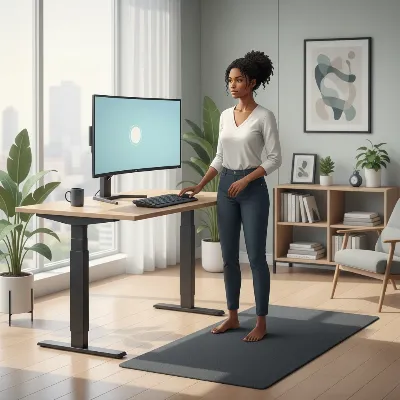 Optimal ergonomic standing desk posture with proper monitor, keyboard, and arm alignment.
Beyond the Desk: Movement and Support
Even with the perfect setup, static standing can lead to fatigue.
- Anti-Fatigue Mat: An anti-fatigue mat is a non-negotiable accessory for standing desk users. It provides cushioning that reduces pressure on your feet, legs, and lower back, encouraging subtle micro-movements that promote circulation and comfort.
- Supportive Footwear: Wear comfortable, supportive shoes. Avoid standing barefoot or in unsupportive slippers for extended periods, as this can lead to foot pain and affect your overall posture.
- Active Standing: Don’t just stand still. Shift your weight occasionally, perform gentle calf raises, or do simple stretches. Movement is key to preventing discomfort and maximizing the benefits.
Conclusion
The journey to better posture and improved well-being doesn’t have to be a struggle. Standing desks offer a dynamic, powerful tool to combat the pervasive issues of prolonged sitting, significantly enhancing your posture, reducing pain, and boosting your overall health and productivity. However, their true effectiveness hinges on proper usage and ergonomic setup. By embracing the art of alternating between sitting and standing, meticulously adjusting your workstation to fit your body, and integrating active movement throughout your day, you can unlock the full potential of your standing desk. It’s not just about owning the desk; it’s about mastering how to use it as an extension of your commitment to a healthier, more active work life.
Are you ready to improve your workspace and experience the profound difference a properly used standing desk can make for your posture?
Frequently Asked Questions
How long should I stand at a standing desk each day?
Instead of standing for extended periods, aim to alternate between sitting and standing every 30-60 minutes. Start with shorter standing intervals (e.g., 15-20 minutes) and gradually increase as your body adapts. The goal is consistent movement and variation, not static standing for hours.
Can a standing desk worsen my back pain?
If used incorrectly, such as standing for too long without breaks or with poor posture, a standing desk can potentially exacerbate back pain. However, when properly set up and used with alternating sit-stand intervals, it is scientifically proven to reduce lower back, neck, and shoulder pain by promoting better spinal alignment and muscle engagement.
What are the most common posture mistakes people make with standing desks?
Common mistakes include standing too long without breaks, setting the desk or monitor height incorrectly (leading to hunched shoulders or neck strain), leaning on one hip, locking knees, or not using an anti-fatigue mat. Maintaining a neutral spine and active micro-movements are crucial.
How do standing desks improve spinal alignment?
Standing desks improve spinal alignment by encouraging a natural upright posture, which reduces the static load on the lower back and neck. This helps to counteract the slouching and rounded shoulders often associated with prolonged sitting, promoting a more neutral and healthier spinal curve.
What is the “20-8-2 rule” for standing desks?
The “20-8-2 rule” is a popular guideline for using a standing desk effectively: sit for 20 minutes, stand for 8 minutes, and take 2 minutes for light stretching or movement. This alternating rhythm helps prevent fatigue and maintains good circulation throughout the workday.
Are standing desk converters as effective as full standing desks for posture?
Standing desk converters can be effective for improving posture by allowing you to alternate between sitting and standing at your existing desk. While they may offer less work surface or weight capacity than full standing desks, they provide an accessible and affordable way to experience the ergonomic benefits and promote better spinal alignment.
Get our weekly buyer guide
Practical specs, not advice. Unsubscribe anytime.

This desk has seriously helped with my core engagement. I used to slouch so much, but now I’m much more aware of my spinal alignment. It’s amazing how much better I feel after a full day of work. Definitely recommend for anyone looking to combat the negative effects of prolonged sitting.
I was skeptical about standing desks at first, but after reading about how they can help with forward head posture, I decided to try one. It’s made a noticeable difference! I try to alternate every 45 minutes or so, and it really helps keep me from slumping. The only reason it’s not a 5-star is that it took a bit to get used to the new routine.
I got a standing desk hoping it would help with my overall discomfort from sitting all day. While it does encourage an upright position, I found that the motor on my electric desk is a bit louder than I expected, which can be a little distracting during calls. It’s still better than just sitting, but the noise is a minor annoyance.
I’ve been using an electric standing desk for about three months now, and it’s been a game-changer for my back pain. The seamless height adjustment is super convenient, and I love being able to switch between sitting and standing throughout the day. My posture has definitely improved, and I feel much less fatigued by the end of my workday.