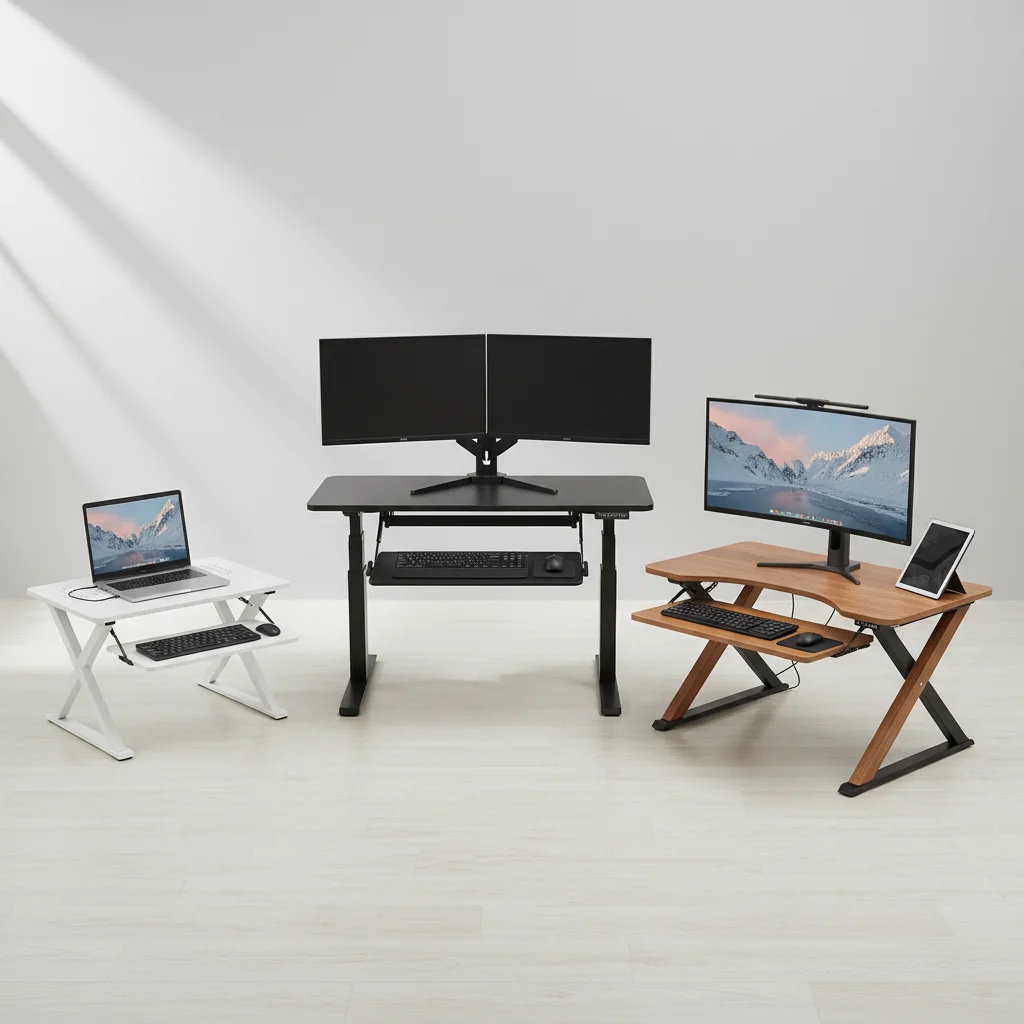
Standing desk converters are designed to provide an ergonomic workstation without replacing your existing desk. While they offer numerous benefits, a common concern is whether they provide enough usable space for your daily tasks. The amount of space offered by standing desk converters varies significantly, with most models providing between 25 to 40 inches of width and 15 to 25 inches of depth for your monitor and keyboard setup.
Understanding Converter Dimensions and Usable Area
When evaluating standing desk converters, it’s crucial to distinguish between the overall footprint and the actual usable surface area. Many manufacturers list the total dimensions, but the space available for your monitor, keyboard, mouse, and other essentials might be smaller due to design elements like monitor mounts or keyboard trays. A typical single-monitor setup requires at least 24 inches of width, while dual monitors often demand 35 inches or more. Consider the depth needed for comfortable typing and mousing, usually around 18-20 inches.
The design of the converter also impacts space. X-frame designs often have a fixed keyboard tray that can limit depth, while Z-frame or post-and-base designs might offer more flexibility. Some models feature tiered surfaces, separating the monitor and keyboard, which can optimize vertical space but sometimes reduce horizontal working area.
Optimizing Space on Your Standing Desk Converter
Even with a compact converter, several strategies can help maximize your usable workspace. Monitor arms, for instance, can free up significant surface area by clamping to the back of the converter or your desk, allowing you to reclaim the space underneath your monitor. Vertical laptop stands can also be effective for those using a laptop as their primary display, creating room for external keyboards and mice.
- Utilize a monitor arm to elevate your screen and free up desktop space.
- Employ a vertical laptop stand if using a laptop, creating more room for peripherals.
- Implement compact keyboard and mouse setups to minimize their footprint.
- Use desk organizers or small shelves to keep essential items tidy and contained.
- Consider a converter with a dedicated, retractable keyboard tray for better depth management.
Choosing the Right Size for Your Workflow
|
Our Picks for the Best Standing Desk in 2026
As an Amazon Associate I earn from qualifying purchases.
|
||
| Num | Product | Action |
|---|---|---|
| 1 | Huuger 55 x 28 Large Electric Standing Desk, Height Adjustable Computer Desk, 27.6" Deep Desktop, Stand up Gaming Office Table with 2 Hooks, 3 Preset Heights, for Home Office, Black |

|
| 2 | Small Height Adjustable Electric Standing Desk, 31.5" x 23.6" Sit Stand up Desk with Splice Board, Ergonomic Rising Computer Home Office Desk Table with Memory Preset, White Frame/White Top |
|
| 3 | Marsail Glass Standing Desk with Drawer 37 x 22 Inches Stand up Desk Standing Desk Adjustable Height with One-Piece Tempered Glass Top, Ergonomic Home Office Desk with 4 Preset Heights White |
|
| 4 | HUANUO Electric Small Standing Desk, 35" x 20" Whole Piece Desktop, Adjustable Height Computer Desk, 4 Height Memory Settings, Sit Stand Up Desk for Home Office, White |
|
| 5 | Kingant Standing Desk Height Adjustable Small Electric Stand Up Desks [35 x 20 Inch] - Ergonomic Sit Stand Desk Rising Desks for Home Office Computer Desk Stand Desk Workstation with Cable Management |
|
| 6 | ERGOMAKER Electric Standing Desk, 67" x 23.6" Height Adjustable Sit Stand Desk with Splice Board for Home Office, Computer Table Memory Preset (White Frame, White Desktop) |
|
| 7 | Adjustable Standing Desk with Cable Management, 48 X 24 Inches Electric Stand Up Desk, 176LBS Load, 2 Memory Preset Height Table for Home Office Work with Splice Board (Rustic Brown Desktop) |
|
| 8 | Standing Desk, Height Adjustable Electric Stand up Desk, 55 x 24 Inches Sit Stand Home Office Desk with Splice Board, Black Frame/Black Top |
|
| 9 | HUANUO 32" Small Electric Standing Desk Adjustable Height, 4 Memory Height Settings, Sit Stand Up Desk for Home Office & Computer Workstation, LightWalnut |
|
| 10 | ERGOMAKER 63" Electric Standing Desk, Adjustable Height, Sit Stand Up Desk for Home Office & Computer Workstations, Memory Controller, White |
|
The ideal size of your standing desk converter depends entirely on your specific workflow and equipment. If you primarily use a single laptop and a small external mouse, a compact converter around 25-30 inches wide might suffice. However, if you work with dual monitors, a full-sized keyboard, and require space for documents or notebooks, you’ll need a larger model, often exceeding 35 inches in width. Always measure your existing desk space and your equipment before purchasing to ensure a proper fit and adequate working area.
Think about future needs as well. If you anticipate adding a second monitor or more peripherals, investing in a slightly larger converter from the outset can prevent the need for an upgrade later. Many users find that a converter with a minimum width of 30 inches provides a good balance for most single-monitor setups, offering enough room for a keyboard, mouse, and a few small accessories without feeling cramped.
Common Converter Sizes and Their Applications
Most standing desk converters fall into a few general size categories. Small converters (25-30 inches wide) are ideal for single laptops or very compact single-monitor setups, often used in tight spaces. Medium converters (30-35 inches wide) are popular for single monitors with a full-sized keyboard and mouse, offering a comfortable amount of space for everyday tasks. Large converters (35-45 inches wide) are best suited for dual-monitor setups or users who require ample space for multiple devices, documents, and other work essentials.Some extra-large models can even accommodate triple monitors, though these are less common and require a very sturdy existing desk.
The depth of the keyboard tray is also a critical factor. A shallow tray can lead to discomfort, forcing your wrists into an awkward position. Look for models that offer at least 10-12 inches of depth on the keyboard surface to ensure ergonomic comfort.Always check user reviews for feedback on actual usable space, as manufacturer specifications can sometimes be misleading.
Get our weekly buyer guide
Practical specs, not advice. Unsubscribe anytime.
