A wobbly standing desk can be quickly stabilized at home by tightening all fasteners, leveling the legs with adjustable foot pads, or using shims for uneven floors. These adjustments often resolve common instability issues, restoring a solid and dependable surface for productive work. Addressing wobble promptly enhances focus and supports the ergonomic benefits of a dynamic workspace.
Common Causes of Standing Desk Wobble
Understanding the root cause of your desk’s instability is the first step toward a lasting fix. Several factors can contribute to a wobbly standing desk, ranging from simple assembly issues to environmental challenges. Identifying these can help you pinpoint the exact problem and apply the most effective solution.
Loose Hardware
One of the most frequent culprits behind a shaky desk is simply loose screws or bolts. Over time, and with repeated adjustments of height, the fasteners holding your desk’s frame and desktop together can gradually loosen. This applies especially to the bolts connecting the leg columns to the central crossbar and those securing the desktop to the frame itself. Even a slight loosening can introduce play into the structure, leading to a noticeable wobble, particularly when the desk is at a higher standing position.
Uneven Surfaces
Your floor might look perfectly flat, but subtle imperfections can cause a desk with rigid legs to become unstable. Uneven flooring, such as slight dips, warped floorboards, or even the soft, shifting nature of thick carpets and underlays, can prevent all of your desk’s feet from making solid, simultaneous contact with the ground. This creates a rocking motion, similar to a chair with one short leg, and is often magnified as the desk extends to its full standing height.
Uneven Weight Distribution
How you arrange your equipment on your standing desk can significantly impact its stability. If heavy items like monitors, CPU towers, or large speakers are concentrated on one side or at the very edges of the desk, they can create an unbalanced load. This uneven distribution acts as a lever, amplifying any small movement or sway in the desk’s structure. Balancing the weight across the desktop, directly over the supporting frame, is crucial for maintaining stability.
Desk Design and Quality
While often not a “quick fix,” the inherent design and quality of your standing desk play a significant role in its overall stability. Desks with lightweight, flimsy frames, fewer telescoping leg stages (like two-stage versus three-stage designs), or a lack of robust cross supports are more prone to wobble. The precision of the internal glides and fittings within the leg columns also matters; looser tolerances can lead to more play and instability, especially at extended heights. While you can’t change your desk’s fundamental design, understanding this helps manage expectations and guides future purchasing decisions.
Quick Fixes for a Wobbly Standing Desk
The good news is that many common wobbling issues can be resolved quickly and easily using basic tools and a bit of patience. Before you begin, clear your desk of all heavy items, especially monitors, to work safely and feel the frame’s true stability.
Tighten All Fasteners
|
Our Picks for the Best Standing Desk in 2026
As an Amazon Associate I earn from qualifying purchases.
|
||
| Num | Product | Action |
|---|---|---|
| 1 | HUANUO Electric Small Standing Desk, 35" x 20" Whole Piece Desktop, Adjustable Height Computer Desk, 4 Height Memory Settings, Sit Stand Up Desk for Home Office, White |

|
| 2 | Standing Desk, Height Adjustable Electric Stand up Desk, 55 x 24 Inches Sit Stand Home Office Desk with Splice Board, Black Frame/Black Top |
|
| 3 | Small Height Adjustable Electric Standing Desk, 31.5" x 23.6" Sit Stand up Desk with Splice Board, Ergonomic Rising Computer Home Office Desk Table with Memory Preset, White Frame/White Top |
|
| 4 | Adjustable Standing Desk with Cable Management, 48 X 24 Inches Electric Stand Up Desk, 176LBS Load, 2 Memory Preset Height Table for Home Office Work with Splice Board (Rustic Brown Desktop) |
|
| 5 | Kingant Standing Desk Height Adjustable Small Electric Stand Up Desks [35 x 20 Inch] - Ergonomic Sit Stand Desk Rising Desks for Home Office Computer Desk Stand Desk Workstation with Cable Management |
|
| 6 | ERGOMAKER 63" Electric Standing Desk, Adjustable Height, Sit Stand Up Desk for Home Office & Computer Workstations, Memory Controller, White |
|
| 7 | HUANUO 32" Small Electric Standing Desk Adjustable Height, 4 Memory Height Settings, Sit Stand Up Desk for Home Office & Computer Workstation, LightWalnut |
|
| 8 | Huuger 55 x 28 Large Electric Standing Desk, Height Adjustable Computer Desk, 27.6" Deep Desktop, Stand up Gaming Office Table with 2 Hooks, 3 Preset Heights, for Home Office, Black |
|
| 9 | ERGOMAKER Electric Standing Desk, 67" x 23.6" Height Adjustable Sit Stand Desk with Splice Board for Home Office, Computer Table Memory Preset (White Frame, White Desktop) |
|
| 10 | Marsail Glass Standing Desk with Drawer 37 x 22 Inches Stand up Desk Standing Desk Adjustable Height with One-Piece Tempered Glass Top, Ergonomic Home Office Desk with 4 Preset Heights White |
|
This is often the most effective and simplest solution. Grab an Allen key or screwdriver and methodically go over every bolt and screw on your desk’s frame and where the desktop attaches. Focus particularly on:
- Leg-to-frame connections: The bolts holding the leg columns to the horizontal crossbars or frame ends.
- Crossbar connections: Any bolts that secure the central expandable cross support.
- Desktop mounting screws: The screws or brackets attaching the desktop surface to the underlying frame.
Tighten each fastener until you feel firm resistance, then give it an additional quarter-turn to ensure it’s snug without over-tightening, which can strip threads. For parts with multiple bolts, like a leg attachment, tighten them in a cross-pattern (like tightening lug nuts on a car wheel) to distribute pressure evenly. 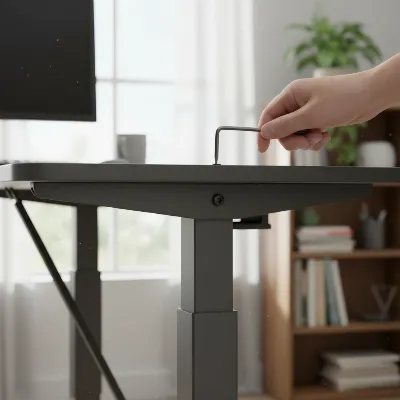 Person tightening a standing desk screw with an Allen key to fix wobble
Level the Legs and Adjust Foot Pads
Most standing desks come with adjustable leveling glides or feet at the bottom of each leg. These are designed to compensate for uneven floors.
- Identify the wobbly leg: With the desk empty, gently rock it from side to side and front to back to determine which corner is lifting off the floor. This is often the shortest-feeling leg or the one on a lower spot of an uneven floor.
- Adjust the foot pad: Turn the foot pad counter-clockwise to extend it downwards, or clockwise to retract it. Make small adjustments, about a half-turn at a time.
- Test and repeat: After each adjustment, give the desk another gentle push. Continue to adjust the feet until all four corners make firm contact with the floor, and the desk feels completely stable without rocking or wiggling. You might need to adjust more than one leg to achieve perfect balance.
Use Shims for Uneven Floors
If your floor is significantly uneven and the built-in leveling feet don’t offer enough range, shims can be a quick and effective solution. Shims are thin, wedge-shaped pieces of wood or plastic available at any hardware store.
- Locate the wobbly leg: Identify the leg that isn’t making full contact with the floor, even after adjusting the foot pads.
- Slide in a shim: Carefully slide one or more shims under the identified leg until the desk becomes stable and level.
- Trim if necessary: If the shim protrudes unsightly, you can carefully trim the excess with a utility knife to hide it from view. For hard floors, soft plastic shims can also help prevent sliding.
Redistribute Weight
An overloaded or unevenly loaded desk can quickly lead to wobble. Assess the items on your desktop:
- Centralize heavy items: Move heavier equipment, such as monitors, speakers, and PC towers, closer to the center of the desk and directly over the supportive frame and legs.
- Utilize monitor arms: If you have multiple monitors or a very heavy screen, consider investing in a monitor arm. This attaches directly to the desk frame or clamps to the edge, lifting the monitor off the desktop surface and reducing the overall load and leverage points that can cause wobble.
Add Anti-Slip Pads or a Mat
For desks on hard floors like wood, tile, or laminate, small anti-slip pads or a dense desk mat placed under each foot can make a surprising difference. These items create friction, absorb minor vibrations, and prevent the desk from sliding, contributing to a more stable feel. Look for rubber pads or specialized anti-vibration mats designed for furniture.
Secure the Desktop
Sometimes, the desktop itself isn’t firmly attached to the frame, leading to movement separate from the legs.
- Inspect attachment points: Turn the desktop upside down (if possible and safe to do so) or carefully inspect the underside of your desk.
- Tighten desktop screws: Ensure all screws and brackets connecting the desktop to the metal frame are securely fastened. Use a drill or screwdriver, tightening firmly but avoiding stripping the screws. A well-secured desktop is integral to the overall rigidity of your standing desk.
Consider a Clamp-on Stabilizer Bar
For standing desks with two-leg frames that experience significant side-to-side wobble, a clamp-on stabilizer bar can provide additional structural support. These aftermarket accessories typically attach horizontally between the legs using heavy-duty C-clamps, increasing the rigidity of the frame. They are usually adjustable in length to fit various desk sizes and are designed to reduce unwanted movement, especially at higher standing heights. This is a simple upgrade that can dramatically improve stability without requiring complex installation.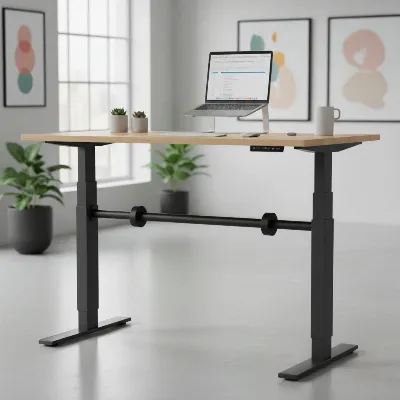 Clamp-on stabilizer bar installed on a standing desk frame
Conclusion
A wobbly standing desk can be a significant annoyance, hindering your focus and undermining the ergonomic benefits you seek. However, by systematically checking for common issues like loose fasteners, uneven floors, or improper weight distribution, you can often quickly restore stability to your workstation. Simple tools and a few minutes of your time can transform a shaky setup into a solid, dependable surface for productive work. Regularly check your desk’s stability as part of your home office maintenance. A stable desk protects your equipment and, more importantly, supports your well-being, allowing you to enjoy the full advantages of a dynamic workspace.
What quick fix has worked best for stabilizing your standing desk, and how has it impacted your daily work?
Frequently Asked Questions
Why does my standing desk wobble more when it’s higher?
When your standing desk is extended to a higher position, its center of gravity is raised, and the leverage acting on the legs increases. Even minor imperfections in the floor or slight looseness in the frame are magnified, making the wobble more noticeable. Desks with more telescoping leg stages (e.g., three-stage) generally offer better stability at height.
What tools do I need to fix a wobbly standing desk?
Most wobbly standing desks can be fixed with basic tools like an Allen key (often included with the desk), a screwdriver (Phillips or flathead, depending on your desk’s hardware), and potentially a spirit level or a smartphone leveling app. For severely uneven floors, shims (small wooden or plastic wedges) might be useful.
Can a standing desk wobbling damage my monitors or computer?
While minor wobble is usually harmless, excessive or frequent shaking can potentially put strain on monitor stands, cables, and connections over time. More importantly, it can be distracting and uncomfortable for you. Addressing the wobble quickly helps protect your equipment and your focus.
How often should I check my standing desk for wobble?
It’s a good practice to perform a quick stability check and tighten any loose fasteners every 3 to 6 months. Regular use and height adjustments can cause bolts to loosen gradually. Proactive maintenance can prevent significant wobble from developing and ensure your desk remains stable.
Will placing my desk on carpet make it more stable?
Placing a standing desk directly on thick carpet or a soft underlay can sometimes worsen wobble, as the compressible surface allows the desk legs to sink unevenly or shift. For carpeted floors, using a rigid chair mat or larger foot disks under the desk’s feet can help distribute the weight more evenly and create a more stable foundation.
Frequently Asked Questions
Why does my standing desk wobble more when it's higher?
When a standing desk is extended to a higher position, its center of gravity is raised, increasing leverage on the legs. This magnifies minor imperfections or looseness, making wobble more noticeable. Desks with three-stage telescoping legs generally offer better stability at extended heights.
What tools are needed to fix a wobbly standing desk?
Most wobbly standing desks can be fixed with basic tools such as an Allen key (often included with the desk), a Phillips or flathead screwdriver, and a spirit level or smartphone leveling app. For significantly uneven floors, small wooden or plastic shims may also be useful.
Can a wobbling standing desk damage my monitors or computer?
While minor wobble is usually harmless, excessive or frequent shaking can potentially strain monitor stands, cables, and connections over time. More importantly, it can be distracting and uncomfortable for the user. Addressing the wobble quickly helps protect both equipment and focus.
How often should I check my standing desk for stability?
It is good practice to perform a quick stability check and tighten any loose fasteners every 3 to 6 months. Regular use and height adjustments can cause bolts to gradually loosen. Proactive maintenance helps prevent significant wobble and ensures the desk remains stable.
Will placing my standing desk on carpet improve its stability?
Placing a standing desk directly on thick carpet or a soft underlay can sometimes worsen wobble because the compressible surface allows the desk legs to sink unevenly or shift. For carpeted floors, using a rigid chair mat or larger foot disks under the desk's feet can help distribute weight more evenly and create a more stable foundation.
Quick Fixes for a Wobbly Standing Desk
Learn how to quickly stabilize your standing desk by addressing common issues like loose hardware, uneven surfaces, and improper weight distribution.
Use an Allen key or screwdriver to methodically tighten every bolt and screw on your desk's frame and where the desktop attaches. Focus on leg-to-frame, crossbar, and desktop mounting connections. Tighten until firm, then add a quarter-turn, using a cross-pattern for multiple bolts.
Identify the wobbly leg by gently rocking the empty desk. Adjust the foot pad by turning it counter-clockwise to extend or clockwise to retract, making small half-turn adjustments. Continue to test and adjust until all four corners make firm contact with the floor and the desk feels stable.
If built-in leveling feet are insufficient for a significantly uneven floor, slide thin, wedge-shaped shims under the wobbly leg. Carefully slide one or more shims until the desk becomes stable and level. Trim any protruding excess with a utility knife for a cleaner look.
Assess the items on your desktop and move heavier equipment, such as monitors, speakers, and PC towers, closer to the center of the desk. Position them directly over the supportive frame and legs. Consider using monitor arms to lift screens off the desktop, reducing overall load and leverage points.
For desks on hard floors like wood, tile, or laminate, place small anti-slip pads or a dense desk mat under each foot. These items create friction, absorb minor vibrations, and prevent the desk from sliding. Look for rubber pads or specialized anti-vibration mats designed for furniture.
Get our weekly buyer guide
Practical specs, not advice. Unsubscribe anytime.

This was super helpful! I’ve been dealing with a really annoying wobble on my standing desk for months, and I was about to buy a whole new one. The advice on leveling the legs with adjustable foot pads completely solved the problem. My desk is now rock-solid, and I can enjoy the ergonomic benefits without any distractions. Highly recommend checking your leg levels!
I was so frustrated with my standing desk wobbling every time I typed, especially at its highest setting. The tip about tightening all the fasteners made a huge difference! It feels so much more solid now, and I can actually focus on my work instead of feeling like my monitor is going to tip over. Definitely a game-changer for my productivity.
I never realized how much a wobbly desk affected my focus until I fixed it. My desk from Amazon was always a bit shaky, and I thought that was just how it was. After reading about checking for loose hardware, I found a couple of screws that were barely finger-tight. Tightening them up made a noticeable improvement, and now my workspace feels much more dependable.
My desk has always had a slight wobble, and I tried the adjustable foot pads suggestion. It helped a little bit, but it’s still not perfectly stable, especially when I lean on it. I think my floor might be the main issue, so I’ll probably have to try shims next. It’s better than before, but not a complete fix for me.