To safely reset an electric standing desk, first clear the desk surface and surrounding area, then unplug the desk from the wall outlet. Wait 30-60 seconds for residual power to discharge, then plug it back in. Immediately press and hold the “down” button on the control panel until the desk reaches its lowest point and continues to hold for an additional 10-15 seconds until you hear a beep or see a display change like “ASr” or “RST.” This recalibrates the motors and resolves common issues like uneven movement or error codes, restoring full functionality.
Understanding Your Standing Desk
Before diving into troubleshooting, it’s beneficial to understand the different types of standing desks available. Each type offers unique advantages, but electric models stand out for their advanced features and ease of use.
Types of Standing Desks
Electric Standing DesksThese are the most popular and technologically advanced options. Electric standing desks utilize one or more motors to adjust the height of the desktop with the simple push of a button. They offer effortless transitions, often come with programmable memory presets for your preferred sitting and standing heights, and can handle significant weight capacities. Dual-motor systems typically provide faster, quieter, and more stable adjustments compared to single-motor models, making them ideal for users who switch positions frequently.
Manual Standing DesksManual standing desks rely on a hand crank or a spring-loaded lever mechanism to adjust height. They are generally more budget-friendly and do not require a power source, offering greater flexibility in placement. While they might demand more physical effort and time for adjustments, their simpler design with fewer electronic components can sometimes translate to higher durability and lower maintenance needs, as there are fewer potential points of failure.
Standing Desk ConvertersFor those not ready to invest in a full standing desk or with limited space, converters offer an excellent entry-level solution. These units sit on top of an existing traditional desk, elevating your monitors and keyboard to a standing height. Converters can be manual (using gas springs or levers) or electric, providing varying degrees of convenience and support. They are a practical way to experience the benefits of standing work without replacing your entire workstation.
The Essential Buying Guide for Standing Desks
Choosing the right standing desk is a long-term investment in your health and productivity. With numerous options on the market, understanding key features will help you make an informed decision, ensuring your desk serves you reliably for years to come.
Assessing Your Usage Needs
|
Our Picks for the Best Standing Desk in 2026
As an Amazon Associate I earn from qualifying purchases.
|
||
| Num | Product | Action |
|---|---|---|
| 1 | HUANUO 32" Small Electric Standing Desk Adjustable Height, 4 Memory Height Settings, Sit Stand Up Desk for Home Office & Computer Workstation, LightWalnut |

|
| 2 | Small Height Adjustable Electric Standing Desk, 31.5" x 23.6" Sit Stand up Desk with Splice Board, Ergonomic Rising Computer Home Office Desk Table with Memory Preset, White Frame/White Top |
|
| 3 | Kingant Standing Desk Height Adjustable Small Electric Stand Up Desks [35 x 20 Inch] - Ergonomic Sit Stand Desk Rising Desks for Home Office Computer Desk Stand Desk Workstation with Cable Management |
|
| 4 | Huuger 55 x 28 Large Electric Standing Desk, Height Adjustable Computer Desk, 27.6" Deep Desktop, Stand up Gaming Office Table with 2 Hooks, 3 Preset Heights, for Home Office, Black |
|
| 5 | HUANUO Electric Small Standing Desk, 35" x 20" Whole Piece Desktop, Adjustable Height Computer Desk, 4 Height Memory Settings, Sit Stand Up Desk for Home Office, White |
|
| 6 | ERGOMAKER Electric Standing Desk, 67" x 23.6" Height Adjustable Sit Stand Desk with Splice Board for Home Office, Computer Table Memory Preset (White Frame, White Desktop) |
|
| 7 | Standing Desk, Height Adjustable Electric Stand up Desk, 55 x 24 Inches Sit Stand Home Office Desk with Splice Board, Black Frame/Black Top |
|
| 8 | Adjustable Standing Desk with Cable Management, 48 X 24 Inches Electric Stand Up Desk, 176LBS Load, 2 Memory Preset Height Table for Home Office Work with Splice Board (Rustic Brown Desktop) |
|
| 9 | ERGOMAKER 63" Electric Standing Desk, Adjustable Height, Sit Stand Up Desk for Home Office & Computer Workstations, Memory Controller, White |
|
| 10 | Marsail Glass Standing Desk with Drawer 37 x 22 Inches Stand up Desk Standing Desk Adjustable Height with One-Piece Tempered Glass Top, Ergonomic Home Office Desk with 4 Preset Heights White |
|
Consider your daily routine and specific requirements. Will you be switching positions frequently throughout the day, or just occasionally? Do you use multiple heavy monitors or other equipment? How much workspace do you genuinely need? Your answers will guide your choices regarding adjustment mechanism, desk size, and weight capacity. For instance, frequent adjusters will greatly appreciate the convenience and speed of an electric desk with memory presets.
Key Features to Prioritize
Stability and DurabilityA wobbly desk is not only distracting but can also be unsafe for your valuable equipment. Look for frames made from high-quality steel, which provides superior strength and longevity. For electric desks, dual-motor systems often deliver enhanced stability, particularly at maximum height, along with smoother and faster operation. Designs with wider bases or T-shaped legs can also contribute to overall stability.
Height Range and ErgonomicsAn effective standing desk must accommodate your body’s specific ergonomic needs. The desk’s height range should allow you to achieve an ergonomic posture whether sitting or standing. When standing, your elbows should form a 90-degree angle, and your monitor should be at eye level. Shorter or taller individuals need to pay extra attention to the maximum and minimum height specifications to ensure the desk fits them comfortably.
Weight CapacityBefore purchasing, calculate the total weight of all items you intend to place on your desk, including monitors, laptops, speakers, books, and accessories. Electric desks generally boast higher weight capacities, often ranging from 150 to over 300 pounds. Exceeding this limit can strain the motors, potentially leading to malfunctions or even instability.
Motor Performance and Noise (for electric desks)For electric desks, the quality of the motor system is paramount. Look for desks with certified, lift-tested motors that offer a good balance of speed and quiet operation. Dual-motor systems are usually quieter and faster than single-motor setups. A smooth, unobtrusive adjustment mechanism ensures your workflow isn’t disrupted by loud whirring sounds.
Control Panel and Smart FeaturesModern electric standing desks offer various control panel options. Basic button controls are straightforward, while more advanced models feature LCD screens with smart capabilities. Memory presets are a significant convenience, allowing you to save your ideal sitting and standing heights for quick transitions. Some desks even include timed reminders to encourage posture changes, which can be invaluable for maintaining a dynamic workday.
Safely Resetting Your Electric Standing Desk: A DIY Guide
Even the most robust electric standing desks can occasionally encounter issues such as uneven movement, failure to adjust, or display error codes. A simple reset procedure often resolves these common problems, saving you time and the hassle of professional service.
Why Your Electric Standing Desk Needs a Reset
Electric standing desks are complex systems with motors, control boxes, and sensors that need to operate in perfect synchronization. Various factors can disrupt this balance, necessitating a reset:
- Common Issues and Error Codes: Your desk might get stuck at a certain height, refuse to move up or down, or exhibit uneven leg movement. Error codes like “ASr” or “RST” often indicate a need for recalibration or signal a software malfunction.
- Power Fluctuations: A power outage, a loose plug, or even being unplugged and re-plugged incorrectly can cause the internal components to lose their synchronization.
- Overload or Obstacles: Activating the anti-collision mechanism by hitting an obstruction or exceeding the desk’s weight limit can trigger a safety lockout, requiring a reset to clear the system.
- Motor Synchronization: Over time, or due to uneven weight distribution, the motors in multi-legged desks can fall out of sync, leading to one leg moving more than the other.
Safety First: Before You Begin
Before attempting any reset procedure, prioritize safety to prevent damage to your desk or personal injury.
- Clear the Area: Remove all items from your desk surface and clear any obstructions from beneath or around the desk legs. Ensure there’s nothing that could interfere with the desk’s full range of motion.
- Check Power: Verify that the power outlet is functioning correctly by plugging in another device. Ensure all cables connecting the desk to the control box and the power source are securely plugged in.
- Consult Your Manual: While this guide provides general instructions, always refer to your specific desk model’s user manual. Manufacturers often have unique reset sequences that ensure optimal recalibration.
Step-by-Step Reset Procedure
The exact reset procedure can vary slightly by brand, but most electric standing desks follow a similar pattern. Here’s a general guide:
Basic Reset Method (Most Common)
- Lower Completely: If the desk is currently adjustable, press and hold the “down” arrow button on your control panel until the desk reaches its absolute lowest position.
- Continue Holding: Once the desk has stopped moving at its lowest point, continue holding the “down” button for an additional 10 to 15 seconds. You might hear a beep, see a slight dip, or observe a change in the display (e.g., “ASr” or “RST”) indicating that the reset process has initiated.
- Release and Test: Release the button. The desk should now be reset to its factory-calibrated state. Test its movement by raising and lowering it. If it moves smoothly and evenly, the reset was successful.
Hard Reset / Power Cycling (For Persistent Issues)
If the basic reset doesn’t work, a power cycle can often resolve deeper electrical glitches.
- Disconnect Power: Unplug the desk completely from the wall outlet.
- Discharge Residual Power: Press and hold the “down” button on the control panel for about 10 seconds. This helps to discharge any stored electricity in the control box. If your control box has an LED indicator, hold until the light goes out.
- Wait: Wait for at least 30 to 60 seconds. This allows the internal components to fully discharge and reset.
- Reconnect: Plug the desk back into the power source.
- Perform Basic Reset: Immediately follow the “Basic Reset Method” steps (lower the desk and hold the down button for 10-15 seconds).
Advanced Troubleshooting Tips
- Check Cable Connections: Unplug and firmly re-plug all cables, especially those connecting the control panel and motors to the main control box. A loose connection is a surprisingly common culprit.
- Inspect for Obstructions: Even small items like a cable or a loose paper can trigger the anti-collision sensor. Ensure the desk path is clear.
- Clean Legs: Dust and debris can accumulate in the lifting columns, affecting smooth operation. Gently wipe down the legs with a soft cloth.
- Faulty Controller: If the desk remains unresponsive after multiple resets, the issue might be with the control panel itself. Contact the manufacturer for assistance.
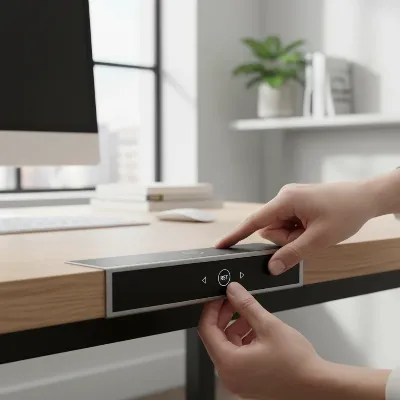 A person’s hands pressing the ‘down’ button on an electric standing desk control panel during a reset process, with a modern office background.
Maximizing the Benefits of Your Standing Desk
Beyond troubleshooting, understanding the full spectrum of benefits associated with standing desks can further enhance your daily work experience. These desks are more than just office furniture; they are tools for better well-being.
Enhancing Physical Health
Prolonged sitting has been linked to numerous health issues, from back pain to cardiovascular disease. Standing desks offer a simple yet effective countermeasure. Regularly switching between sitting and standing positions throughout the day can significantly:
- Reduce Pain: Alleviate common aches in the back, neck, and shoulders by promoting better posture and reducing static load on your spine.
- Improve Circulation: Encourage blood flow, reducing stiffness and the risk of deep vein thrombosis.
- Boost Metabolism: Standing burns more calories than sitting and can help lower blood sugar levels after meals, contributing to weight management and overall metabolic health.
- Increase Energy: Movement helps deliver oxygen to the brain, combating fatigue and keeping you more alert and energized throughout your workday.
Boosting Productivity and Focus
The physical benefits of standing naturally extend to cognitive improvements, making you more effective and engaged in your work.
- Heightened Alertness: Standing can help you stay more awake and focused, especially during traditionally sluggish periods like post-lunch slumps.
- Reduced Discomfort: By minimizing physical discomfort, standing desks allow you to concentrate more fully on tasks rather than being distracted by aches and pains.
- Enhanced Creativity: Changing positions can stimulate different parts of the brain, potentially fostering new ideas and improving problem-solving abilities.
- Improved Mood: Many users report feeling more positive and less stressed when they have the freedom to move and vary their posture, leading to a more pleasant work experience.
“Transitioning to a standing desk can be a major upgrade for workplace well-being. It empowers individuals to take control of their posture and energy levels, leading to noticeable improvements in physical comfort and mental clarity.” – Dr. Emily R. Chen, Ergonomics Specialist
Comparison Table: Electric vs. Manual vs. Converter Desks
To help you visualize the differences, here’s a quick comparison of the main types of standing desk solutions:
| Feature | Electric Standing Desk | Manual Standing Desk | Standing Desk Converter |
|---|---|---|---|
| Adjustment | Motorized, push-button, often programmable | Hand crank/lever, physical effort | Manual (gas spring) or Electric |
| Cost | High | Moderate | Low to Moderate |
| Convenience | Very High | Moderate | Moderate to High |
| Weight Capacity | High | Moderate | Low to Moderate |
| Noise Level | Low to Moderate (motor hum) | Very Low | Very Low to Moderate |
| Portability | Low | Low | High |
| Installation | Moderate (full assembly) | Moderate (full assembly) | Easy (sits on existing desk) |
Conclusion
An electric standing desk is a powerful tool for cultivating a healthier and more productive work life. While occasional glitches might necessitate a reset, understanding the underlying causes and the simple steps involved can quickly get your workstation back in optimal condition. By choosing a desk that meets your needs, maintaining it properly, and actively using its features, you unlock its full potential to improve your physical well-being and cognitive performance. Don’t let a minor technical hiccup deter you from the significant advantages a standing desk offers. Embrace the flexibility, enjoy the enhanced focus, and take charge of your workday. How will you integrate movement into your routine to redefine your workspace?
Frequently Asked Questions
Get our weekly buyer guide
Practical specs, not advice. Unsubscribe anytime.

Fantastic advice! My electric standing desk was giving me grief with an intermittent error, and I was worried I’d have to replace it. The simple unplug and hold ‘down’ button trick worked like a charm. It’s great to know these advanced features can be recalibrated so easily. Definitely saved me a lot of hassle and potential expense.
My desk was stuck at a weird height, and I couldn’t get it to move. I followed the reset instructions, especially the part about clearing the desk surface, and it did eventually get it to go down to the lowest point. However, it took a couple of tries for the ‘RST’ display to show up, which was a bit confusing. It’s working now, but it wasn’t as smooth as I hoped.
This guide was a lifesaver! My electric standing desk started acting up, moving unevenly, and I was so frustrated. I followed the steps to unplug, wait, and then hold the ‘down’ button until it beeped, and it totally fixed the issue. It’s back to working perfectly now. So glad I didn’t have to call for service!
I’ve had my standing desk for about a year and recently got an ‘ASr’ error code that wouldn’t go away. I tried the reset method described here, holding the down button for the extra 10-15 seconds, and it cleared right up. The instructions were clear and easy to follow. My only minor complaint is that the waiting time of 30-60 seconds felt a bit long when I was eager to get it working again, but it was worth it.