Glass top standing desks combine contemporary aesthetics with ergonomic functionality, making them a popular choice for modern workspaces. These desks are primarily electric adjustable models, featuring motorized legs for effortless height changes and often including programmable memory presets. While offering a sleek appearance and promoting better health and productivity, they require frequent cleaning and careful consideration for monitor arm compatibility.
Popular Types of Standing Desks with Glass Tops
While standing desks come in various forms, glass tops are most commonly found integrated into electric adjustable models. The inherent characteristics of glass make it less suitable for manual crank mechanisms or lightweight converters, where durability and ease of adjustment might be compromised.
Electric Glass Top Standing Desks
Electric glass top standing desks are the most prevalent and popular option. These desks feature motorized legs that allow for effortless height adjustments with the push of a button. Many models include programmable memory presets, enabling users to save their ideal sitting and standing heights for quick transitions throughout the day. The electric mechanism ensures a smooth, quiet operation, making it ideal for both home and professional office settings. Often, these desks come with integrated features such as USB charging ports, wireless charging pads, and discreet drawers, enhancing both functionality and a minimalist aesthetic. The use of tempered glass is paramount for these desks, providing crucial strength and safety for daily use.
Manual Glass Top Standing Desks
While less common, some standing desks with glass tops may utilize a manual crank system for height adjustment. These typically offer a more budget-friendly option and do not require a power source, providing flexibility in placement. However, the manual adjustment can be more cumbersome and time-consuming, potentially disrupting workflow. The weight of a glass top can also make manual adjustment more physically demanding compared to lighter desktop materials. Durability and stability are key considerations, with tempered glass remaining essential.
Tempered Glass: The Foundation of Durability
Regardless of the adjustment mechanism, the type of glass used for the desktop is a critical factor. High-quality glass standing desks almost exclusively feature tempered glass. This material undergoes a special heating and cooling process, making it significantly stronger and more resistant to impact than regular glass. If tempered glass does break, it’s designed to shatter into small, relatively harmless, pebble-like pieces, reducing the risk of injury. This makes tempered glass a preferred choice for office environments where the desk might endure heavy usage.
Comprehensive Buying Guide for Glass Top Standing Desks
Selecting the perfect glass top standing desk involves more than just admiring its sleek design; it requires careful consideration of your specific needs, the desk’s construction, and its integrated features.
1. Define Your Usage Needs
|
Our Picks for the Best Standing Desk in 2026
As an Amazon Associate I earn from qualifying purchases.
|
||
| Num | Product | Action |
|---|---|---|
| 1 | Marsail Glass Standing Desk with Drawer 37 x 22 Inches Stand up Desk Standing Desk Adjustable Height with One-Piece Tempered Glass Top, Ergonomic Home Office Desk with 4 Preset Heights White |

|
| 2 | Huuger 55 x 28 Large Electric Standing Desk, Height Adjustable Computer Desk, 27.6" Deep Desktop, Stand up Gaming Office Table with 2 Hooks, 3 Preset Heights, for Home Office, Black |
|
| 3 | Kingant Standing Desk Height Adjustable Small Electric Stand Up Desks [35 x 20 Inch] - Ergonomic Sit Stand Desk Rising Desks for Home Office Computer Desk Stand Desk Workstation with Cable Management |
|
| 4 | HUANUO 32" Small Electric Standing Desk Adjustable Height, 4 Memory Height Settings, Sit Stand Up Desk for Home Office & Computer Workstation, LightWalnut |
|
| 5 | HUANUO Electric Small Standing Desk, 35" x 20" Whole Piece Desktop, Adjustable Height Computer Desk, 4 Height Memory Settings, Sit Stand Up Desk for Home Office, White |
|
| 6 | Standing Desk, Height Adjustable Electric Stand up Desk, 55 x 24 Inches Sit Stand Home Office Desk with Splice Board, Black Frame/Black Top |
|
| 7 | ERGOMAKER Electric Standing Desk, 67" x 23.6" Height Adjustable Sit Stand Desk with Splice Board for Home Office, Computer Table Memory Preset (White Frame, White Desktop) |
|
| 8 | Small Height Adjustable Electric Standing Desk, 31.5" x 23.6" Sit Stand up Desk with Splice Board, Ergonomic Rising Computer Home Office Desk Table with Memory Preset, White Frame/White Top |
|
| 9 | ERGOMAKER 63" Electric Standing Desk, Adjustable Height, Sit Stand Up Desk for Home Office & Computer Workstations, Memory Controller, White |
|
| 10 | Adjustable Standing Desk with Cable Management, 48 X 24 Inches Electric Stand Up Desk, 176LBS Load, 2 Memory Preset Height Table for Home Office Work with Splice Board (Rustic Brown Desktop) |
|
Before diving into options, assess how you plan to use the desk. Will it be for a light laptop setup, or will you be placing heavy equipment like multiple monitors, large PCs, or printers? The intended load directly impacts the required glass thickness and overall frame stability. For heavy-duty use or if the glass top is directly supported by legs, a thickness of 12 to 15mm is recommended. If the glass merely covers an existing wooden surface, a thinner 6mm glass might suffice.
2. Choose the Right Glass Type and Thickness
As highlighted, tempered glass is the gold standard for standing desks due to its enhanced strength and safety properties. Avoid desks with untreated or annealed glass for primary work surfaces. When considering thickness, prioritize durability and safety. Generally, a thickness of 8mm (approximately 3/8 inch) or above is highly recommended for desks that will frequently support heavy items. This ensures stability and resilience for daily use. For a truly luxurious and robust option, fused glass, made by kiln-casting multiple layers into a solid slab, offers superior strength and a unique aesthetic, though it comes at a higher price point.
3. Evaluate Features and Functionality
Modern glass top standing desks often come packed with convenient features:
- Electric vs. Manual: For seamless and quick transitions, an electric desk is superior. Look for models with dual motors for smoother, faster, and often quieter operation compared to single-motor designs.
- Memory Presets: Essential for electric desks, allowing you to save multiple preferred heights (sitting, standing, or for different users).
- Integrated Power & Charging: Many premium models include built-in USB-A and USB-C charging ports, or even wireless charging pads, helping to keep your workspace clutter-free.
- Storage Solutions: Discreet built-in drawers or pencil trays are common and useful for organizing small office supplies without compromising the desk’s clean lines.
- Stability: This is crucial, especially at standing heights. Look for desks with robust steel frames, 3-stage legs (which offer a wider and often more stable height range), and anti-collision sensors for safety. User reviews often provide insights into a desk’s real-world stability.
- Edge Work: While many glass desks have sharp 90-degree edges, some offer rounded or beveled edges for improved comfort, especially if you lean on the desk while typing. [cite: 2, 2 (search result 3)]
4. Consider Aesthetics and Space
Glass desks create an illusion of space, reflecting light and making rooms feel larger and more open. This makes them an excellent choice for smaller offices or those seeking a minimalist design. Consider the frame color (black, white, silver) to match your existing décor. Some glass tops are clear, while others might be frosted or tinted, offering different levels of transparency and privacy.
5. Budget and Warranty
Glass standing desks can range from mid-tier to premium, with higher-end models featuring advanced features and superior build quality often costing between $800 to $1,500. Invest in a desk that offers a solid warranty on both the frame and electronics, as this indicates manufacturer confidence in durability and performance.
Comparison of Popular Glass Top Standing Desk Features
Choosing the right model often comes down to balancing features with your budget. Here’s a comparative look at typical options:
| Model Type | Key Features | Pros | Cons | Price Range (Estimated) |
|---|---|---|---|---|
| Premium Electric Glass | Dual motors, 3-stage legs, memory presets (4+), USB-C/Wireless charging, integrated drawer, anti-collision | Superior stability, fast/quiet adjustment, extensive features, elegant design | Higher price point, heavier | $900 – $1500+ |
| Standard Electric Glass | Single motor, 2-stage legs, memory presets (2-3), USB-A charging, basic drawer | Good value, sleek look, easy adjustment | Slower/noisier lift, limited height range, moderate stability | $600 – $900 |
| Compact Glass | Single motor, 2-stage legs, basic up/down control, minimal features | Space-saving, often more affordable, modern look | Limited features, less stable at height, lowest weight capacity | $400 – $600 |
The Benefits of Using a Glass Top Standing Desk
Beyond their striking appearance, glass top standing desks offer a multitude of advantages that can positively impact both your health and productivity.
Enhance Your Health
Incorporating a standing desk into your daily routine is a well-documented strategy for combating the negative effects of prolonged sitting. A glass top standing desk facilitates these health improvements:
- Reduced Pain: Alternating between sitting and standing can significantly alleviate back, neck, and shoulder pain often associated with static postures.
- Improved Circulation: Standing promotes better blood flow, reducing the risk of circulatory issues and enhancing overall cardiovascular health.
- Increased Energy Levels: Standing helps you stay more alert and less prone to the afternoon slump, preventing fatigue that can set in after hours of sitting.
- Calorie Burn: While not a substitute for exercise, standing burns more calories than sitting, contributing to weight management efforts over time.
Boost Your Productivity and Focus
A dynamic work environment fostered by a standing desk can profoundly impact your cognitive functions and work output. Glass top standing desks, with their clean and modern aesthetic, can further support a focused mindset.
- Greater Alertness: Standing can help you remain more engaged and attentive during tasks, reducing mental fatigue.
- Enhanced Focus: The ability to change positions helps break monotony, preventing distractions and maintaining concentration.
- Creative Boost: Some users report that standing encourages more dynamic thinking and problem-solving, fostering creativity.
- Less Stress: The physical relief provided by standing can reduce overall work-related stress, leading to a more positive and productive mindset.
Aesthetic and Practical Advantages
The unique properties of glass contribute significantly to the desk’s appeal and practicality:
- Sleek and Modern Appearance: Glass desks exude a high-tech, minimalist elegance that instantly elevates any workspace. They fit seamlessly into contemporary decor, adding a touch of sophistication.
- Creates a Sense of Openness: The transparent nature of glass reflects light and minimizes visual clutter, making even small rooms appear more spacious and airy.
- Easy to Clean and Maintain: Unlike porous wood or laminate, glass is non-absorbent, making it resistant to stains and spills. Fingerprints and smudges, though common, can be quickly wiped away with a damp cloth, ensuring a pristine surface. [cite: 1, 4, 3 (search result 3)]
- Doubles as a Dry Erase Board: Many tempered glass surfaces are compatible with dry-erase markers, offering a convenient space for jotting down notes, brainstorming ideas, or creating quick to-do lists without extra whiteboards.
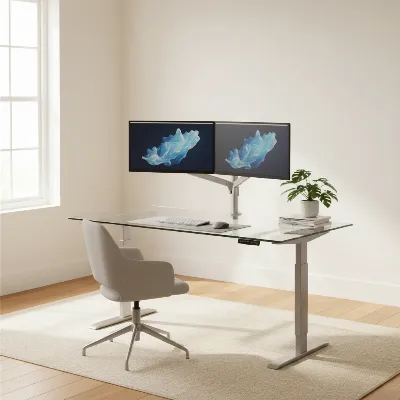 A modern glass top standing desk with dual monitors in a bright, minimalist home office setting, showcasing its sleek design and open feel.
Potential Drawbacks of Glass Top Standing Desks
While glass standing desks offer many benefits, it’s also important to be aware of their potential downsides to make an informed decision.
1. Prone to Fingerprints and Smudges
The most commonly cited drawback of glass desks is their tendency to show every fingerprint, smudge, and dust particle. While easy to clean, this often requires frequent wiping to maintain a spotless appearance, which can be high maintenance for some users.
2. Scratch and Impact Vulnerability
Despite being made from tempered glass, glass surfaces are not entirely immune to scratches. Keys, metal objects, or even rough mouse pads can leave marks over time. Although tempered glass is designed to be stronger, direct, sharp impacts or uneven pressure (such as from C-clamp monitor arms) can still lead to chipping or, in rare cases, shattering.
3. Monitor Arm Compatibility Challenges
Mounting monitor arms with C-clamps directly onto a glass desktop can be risky due to the concentrated pressure they exert. While some users employ protective pads, a safer alternative is to choose desks with built-in monitor arm mounts, or opt for free-standing monitor stands.
4. Acoustic Properties
Glass surfaces can amplify sounds, making the clatter of keyboards, mice, or even a coffee cup more noticeable than on a sound-absorbing wooden desk. This might be a minor annoyance in a quiet home office but could be disruptive in a shared workspace.
5. Temperature and Glare
Glass can feel colder to the touch than wood, which some users might find uncomfortable. Reflective glass surfaces can sometimes create glare from overhead lights or windows, potentially causing eye strain. Positioning and anti-glare accessories can mitigate this.
6. Weight and Cost
Glass desktops, especially thicker tempered versions, can be significantly heavier than their wooden counterparts, making assembly and relocation more challenging. They also tend to be more expensive than basic laminate or particleboard desks due to the material and specialized manufacturing process.
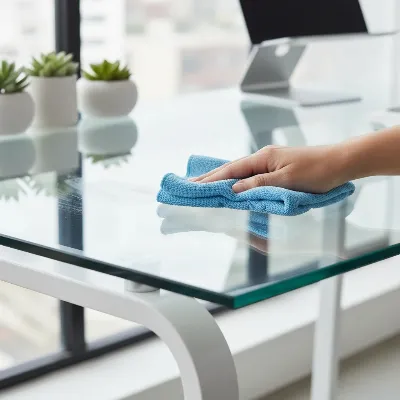 A person wiping a glass top standing desk with a microfiber cloth, showing the ease of cleaning but also hinting at the need for frequent maintenance.
Expert Insight
“The allure of a glass top standing desk lies in its visual lightness and modern appeal, which can truly open up a workspace. However, it’s crucial for users to balance these aesthetic benefits with practical considerations like the need for regular cleaning and potential limitations for certain accessories. Prioritizing tempered glass and a sturdy frame is non-negotiable for both safety and longevity.” – Dr. Emily Chen, Ergonomics Specialist and Workplace Design Consultant
Conclusion
Glass top standing desks offer a compelling combination of sophisticated design and ergonomic functionality, making them an increasingly popular choice for modern workspaces. Their sleek appearance, ability to brighten a room, and easy-to-clean surfaces are significant advantages that can improve your work environment. However, prospective buyers must weigh these benefits against considerations such as frequent cleaning for fingerprints, potential for scratches, and limitations regarding monitor arm attachments.
By carefully considering your specific needs, prioritizing tempered glass for durability and safety, and evaluating integrated features like electric adjustment and charging ports, you can find a glass standing desk that perfectly aligns with your professional demands and aesthetic preferences. The right desk can be a transformative element, supporting your health and boosting your productivity for years to come.
Are you ready to bring a touch of modern elegance and dynamic functionality to your office with a glass top standing desk?
Frequently Asked Questions
Are glass standing desks durable enough for daily office use?
Yes, high-quality glass standing desks are designed for daily use, primarily utilizing tempered glass which is four times stronger than regular glass and shatters safely if broken. Selecting a desk with a thickness of 8mm or more, especially for heavy equipment, ensures enhanced durability.
Do glass standing desks scratch easily?
Glass surfaces, including tempered glass, can be prone to scratches from sharp objects or abrasive materials. While generally resilient, it’s advisable to use desk pads, coasters, and exercise caution to maintain a pristine surface.
How do you keep a glass top standing desk clean?
Glass top desks are easy to clean. Fingerprints, smudges, and dust can typically be wiped away with a damp microfiber cloth. For best results and a streak-free shine, a glass cleaner can also be used, though frequent cleaning may be required.
Can I attach a monitor arm to a glass standing desk?
Attaching C-clamp style monitor arms directly to a glass desktop can be risky due to concentrated pressure. It’s safer to use free-standing monitor stands or choose glass standing desk models that come with integrated monitor arm mounts or reinforced areas for clamp attachments.
Are glass standing desks cold to the touch?
Glass surfaces naturally conduct heat differently than wood or laminate, often feeling cooler to the touch. This can be a minor comfort consideration for some users, but it’s generally not a significant drawback. Using a desk mat can alleviate this if it’s a concern.
Frequently Asked Questions
Are glass standing desks durable enough for daily office use?
Yes, high-quality glass standing desks are designed for daily use, primarily utilizing tempered glass which is four times stronger than regular glass and shatters safely if broken. Selecting a desk with a thickness of 8mm or more, especially for heavy equipment, ensures enhanced durability.
Do glass standing desks scratch easily?
Glass surfaces, including tempered glass, can be prone to scratches from sharp objects or abrasive materials. While generally resilient, it's advisable to use desk pads, coasters, and exercise caution to maintain a pristine surface.
How do you keep a glass top standing desk clean?
Glass top desks are easy to clean. Fingerprints, smudges, and dust can typically be wiped away with a damp microfiber cloth. For best results and a streak-free shine, a glass cleaner can also be used, though frequent cleaning may be required.
Can I attach a monitor arm to a glass standing desk?
Attaching C-clamp style monitor arms directly to a glass desktop can be risky due to concentrated pressure. It's safer to use free-standing monitor stands or choose glass standing desk models that come with integrated monitor arm mounts or reinforced areas for clamp attachments.
Are glass standing desks cold to the touch?
Glass surfaces naturally conduct heat differently than wood or laminate, often feeling cooler to the touch. This can be a minor comfort consideration for some users, but it's generally not a significant drawback. Using a desk mat can alleviate this if it's a concern.
How to Choose a Glass Top Standing Desk
Selecting the ideal glass top standing desk involves evaluating your usage needs, the type and thickness of glass, and essential features for functionality and aesthetics.
Assess how you plan to use the desk, considering the weight of equipment like multiple monitors or PCs. This determines the required glass thickness and frame stability. For heavy use, a thickness of 12-15mm is recommended.
Prioritize tempered glass for its enhanced strength and safety. A thickness of 8mm or more is highly recommended for daily use with heavy items. Avoid untreated or annealed glass for primary work surfaces.
Look for electric desks with dual motors, memory presets, and integrated charging ports for convenience. Consider stability features like robust steel frames and anti-collision sensors. Built-in drawers can help organize small office supplies.
Glass desks create an illusion of space and reflect light, making rooms feel larger. Choose a frame color that matches your decor and decide between clear, frosted, or tinted glass tops for different levels of transparency.
Glass standing desks typically range from $400 to $1500+. Invest in a desk with a solid warranty on both the frame and electronics, as this indicates manufacturer confidence in durability and performance.
Get our weekly buyer guide
Practical specs, not advice. Unsubscribe anytime.

I was hesitant about a glass top standing desk because I heard they scratch easily, but I’m so glad I went for it! The electric adjustable model I got is super smooth, and the memory presets are a game-changer for switching between sitting and standing throughout my workday. It really does make my home office look much more modern and open.
This desk is exactly what I needed! The contemporary aesthetic fits perfectly with my apartment’s decor, and the ergonomic functionality has made a huge difference in my daily comfort. I love that it’s an electric adjustable model; no more struggling with manual cranks. It’s totally worth the price for the quality and design.
I’ve been using a glass top standing desk for about a month now, and it’s definitely improved my posture and energy levels. I was worried about monitor arm compatibility, but after checking the specs carefully, I found one that works great with the glass surface. It’s a solid investment for anyone looking to upgrade their workspace.
The sleek look of my new glass top desk is fantastic, and the motorized legs work perfectly. My only real complaint is how often I have to wipe it down. Fingerprints and dust show up constantly, which is a bit annoying. I knew it would need cleaning, but it’s more frequent than I anticipated.